

AI retrieval often fails before retrieval starts. The problem sits in the files.
Scanned PDFs with no usable text layer, spreadsheets with multiple sections on one sheet, slide decks that trap facts inside images, duplicate exports, and weak version rules all make source material harder to parse, chunk, filter, and verify.
This guide is about document conditioning. It shows how to make PDFs, spreadsheets, slides, and mixed files usable for retrieval without flattening structure or losing traceability.
Quick answer
Preparing documents for AI retrieval means cleaning and structuring source material so an AI system can find the right information and show where it came from. The practical work includes removing duplicates, marking superseded files, improving names, adding ownership and dates, splitting documents into useful sections, and separating internal, public, draft, and approved material.
Who this guide is for
This guide is for teams preparing policies, reports, procedures, knowledge files, or internal documents for AI search, retrieval, or question answering.
It is especially relevant if you are dealing with:
- Your documents are duplicated, outdated, poorly named, or scattered across folders
- AI retrieval returns the wrong file or mixes current and old information
- You need a cleaner source base before building an AI knowledge environment
It is less relevant if:
- You already have a governed document library with clear metadata, ownership, and access rules
Key takeaways
- Do this: start with one live document set, condition the files for usable text and structure, and add metadata before ingestion.
- Avoid this: cleaning every file you can find or treating whole-environment taxonomy design as part of the first prep pass.
- Why it matters: when files are readable, versioned, and easy to trace, retrieval supports search, drafting, review, and later reporting instead of creating more compensation work.
Simple cleanup vs full retrieval environment
Document preparation is the first layer. It gets the material into a better state. A full retrieval environment goes further by adding metadata rules, access rules, answer testing, human review, and update responsibilities.
| Need | Better fit |
|---|---|
| Remove duplicates, label old files, improve names | Simple document cleanup |
| Control approved sources, access, retrieval, and answer review | Full AI-ready knowledge environment |
| Model repeated searching and weak retrieval costs | Internal Knowledge Base ROI Calculator |
What good looks like
| Weak setup | Stronger setup |
|---|---|
| Documents are dumped into one folder | Documents are grouped by source type, audience, owner, and status |
| Old and current files look similar | Superseded, draft, approved, and archived files are clearly labelled |
| Long documents are retrieved as vague chunks | Documents are split into useful sections with clear headings |
| Sensitive and public content are mixed | Internal-only, public, and restricted material are separated before retrieval |
Where this fits in the wider workflow
| Workflow stage | What happens |
|---|---|
| Input | Policies, procedures, PDFs, reports, knowledge files, spreadsheets, and internal guidance |
| Structure | File naming rules, source IDs, metadata, document sections, status labels, and access categories |
| Review | Duplicate checks, currency checks, owner review, sensitivity review, and retrieval testing |
| Output | Cleaner source library, retrieval-ready documents, answer tests, and AI knowledge base inputs |
Before you start
This process is a strong fit when:
- the team is working across PDFs, spreadsheets, slide decks, Word files, or mixed source folders
- retrieval needs to support drafting, analysis, review, or internal question answering
- files include scans, exports, screenshots, charts, or annexures with hidden text problems
- version drift or duplicate files already slow the work down
- the goal is a usable knowledge environment, not just one file upload
Before you begin, make sure you have:
- one pilot document set
- one owner for source-prep decisions
- one list of the retrieval questions the system needs to answer
- one rule for what counts as current, archived, draft, and duplicate
- one place to record document IDs, metadata, and prep status
What good document preparation actually changes
Document preparation is the file-conditioning layer between raw source storage and live retrieval.
It makes text searchable, keeps headings and tables visible, adds metadata filters, prevents stale versions from being treated as current, and gives spreadsheets a predictable record structure. Google Cloud's document parsing guidance, OpenAI's file-search and upload guidance, and Microsoft's chunking guidance all point in the same direction: retrieval quality improves when the source material is readable, structured, and tied to usable metadata.
This matters even before AI. Better preparation improves manual search, speeds source checks, and reduces reporting friction on its own. If the team needs a rough baseline, you can estimate the time lost to search and review before designing the retrieval layer. If you later add a retrieval layer or internal assistant, the results are usually far better. The adjacent articles on AI-ready knowledge environments, evidence workflows for reporting, and report writing workflows all depend on that same preparation layer.
Steps overview
- Define the first document set and the questions it must support
- Audit file types, weak formats, and content risk
- Make the text searchable before you chunk anything
- Preserve layout and chunk around structure
- Add stable IDs and metadata before ingestion
- Control duplicates and current versions
- Clean spreadsheets and tables differently from narrative documents
- Pilot the prepared set on live retrieval questions
Use the steps below in order. Each one fixes a retrieval risk that tends to cause trouble later.
Choose one live document set and the questions it has to answer before you start cleaning files.
Do not start by cleaning every file you can find. Start by choosing one live document set and the questions that set needs to answer.
Write down the live questions people need answered from the document set. That might be:
- Which documents mention this issue?
- Where is the paragraph or table behind this claim?
- What is the latest approved version?
- Which records belong to this geography, programme, or stakeholder group?
- Which sources support this report section or recommendation?
Then define the first document set. Name the folder, the date range, the file types, the owner, and the output the material needs to support. A pilot corpus beats a giant ungoverned upload every time.
If you want the wider retrieval-first framing behind this step, How to Build an AI-Ready Knowledge Environment for Internal Retrieval shows how the question set shapes the whole system.
Map the document set by format and retrieval risk before you decide how to parse it.
Now inspect the files, not just the folders.
Separate:
- digital PDFs with machine-readable text
- scanned PDFs that need OCR
- Word or Docs exports
- slide decks
- spreadsheets and CSVs
- images or screenshots
- mixed bundles with annexures or appendices
For slide decks, export speaker notes where useful and add text captions for diagrams that carry key facts.
Then flag the specific retrieval risks: missing text layers, key facts locked inside charts, duplicate exports, merged documents with unrelated sections, tables broken across pages, and unclear current versions.
This is also where you decide what should stay out of the live index. Archive folders, half-finished drafts, and duplicate exports often create more retrieval noise than value. The broader workflow cost of leaving that mess untouched is exactly what The Real Cost of Messy Evidence Workflows lays out.
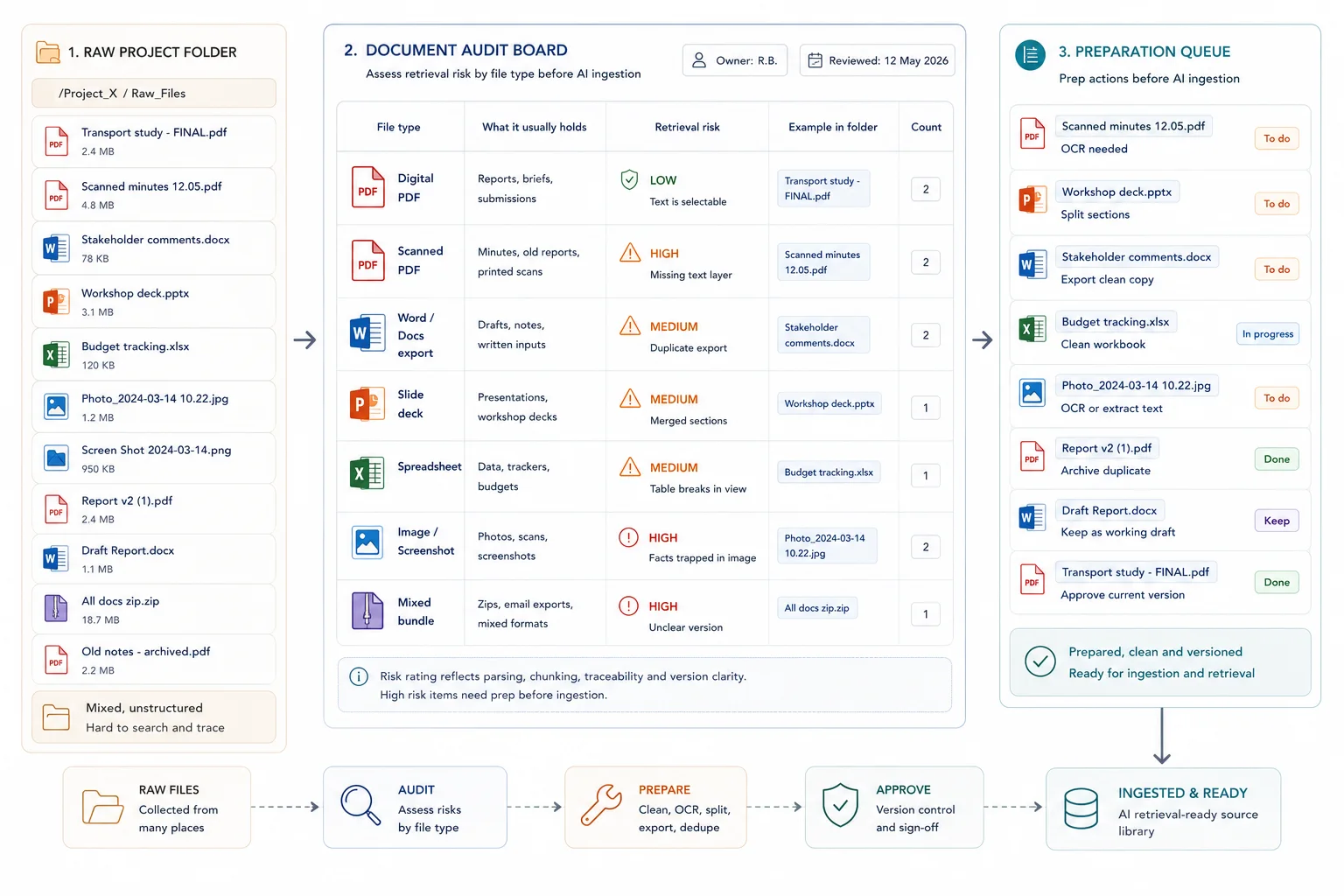
Ensure the system can actually read the content before you worry about embeddings or prompts.
Searchable text comes before semantic retrieval. If the system cannot read the words properly, no chunking strategy will rescue the document later.
For scanned PDFs and images, make sure OCR or another text extraction step is in place. Google's document parsing guidance treats OCR as the route for scanned PDFs and image text, and OpenAI's Visual Retrieval with PDFs FAQ notes that PDFs uploaded as GPT Knowledge or Project Files are still handled with text-only retrieval. The practical rule is simple: if a chart label, infographic, screenshot, or scanned annexure contains critical information, do not leave that information trapped as pixels.
Fix this by:
- running OCR on scans
- replacing image-only tables with real tables where possible
- adding captions or text notes for charts and diagrams
- exporting slides and docs with usable text layers
- checking a sample of OCR output for obvious errors before ingestion
A stronger retrieval input looks like this
- machine-readable text is present
- OCR has been checked on scanned pages
- tables survive as text or real table structures
- charts and diagrams have written captions or descriptions
- annexures with key facts are searchable
A weaker retrieval input looks like this
- image-only pages with no OCR
- screenshots carrying critical facts
- chart labels that exist only as pixels
- low-quality scans with unreadable text
- appendices buried in one large PDF with no text layer
Keep titles, headings, lists, tables, and section boundaries visible to the retrieval layer.
Once the text is readable, protect the structure. Raw page dumps often flatten the very cues that help retrieval stay accurate: titles, headings, lists, tables, and section boundaries.
Google's layout parser guidance is useful here because it explicitly detects elements such as headings, titles, tables, lists, and images. Microsoft makes the same point from a chunking angle: chunks work better when they preserve document structure and semantic coherence rather than cutting blindly by page or token count alone.
In practice, that means:
- keeping headings and section titles clean
- separating annexures or appendices when they serve a different purpose
- avoiding giant merged PDFs when the sections answer different questions
- preserving tables as tables where possible
- chunking around sections or topics rather than arbitrary page breaks
This is also why reporting workflows benefit from structure before drafting. How to Build Evidence Workflows for Reporting and Accountability and Reporting Workflows: From Evidence to Recommendations both rely on that middle layer staying easy to trace.
Add the fields that let search filter, trace, and update documents cleanly.
Metadata is not admin overhead. It is part of retrieval quality. OpenAI's file search guide supports metadata filtering on vector store files, and the same logic appears across search and retrieval systems more broadly. Without stable metadata, the system has a much harder time narrowing results to the right source set, date range, owner, or status.
At this stage, think in document-level metadata and update control, not in whole-environment taxonomy design.
At a minimum, every live document or record should have a stable ID plus the fields that reflect real work. That usually includes document type, owner, date, status, workstream, confidentiality, and version state. If the content will feed drafting or synthesis later, add the fields that make source checks easier.
This is the same control layer that underpins source traceability in How to Synthesise Stakeholder Submissions Without Losing Source Traceability.
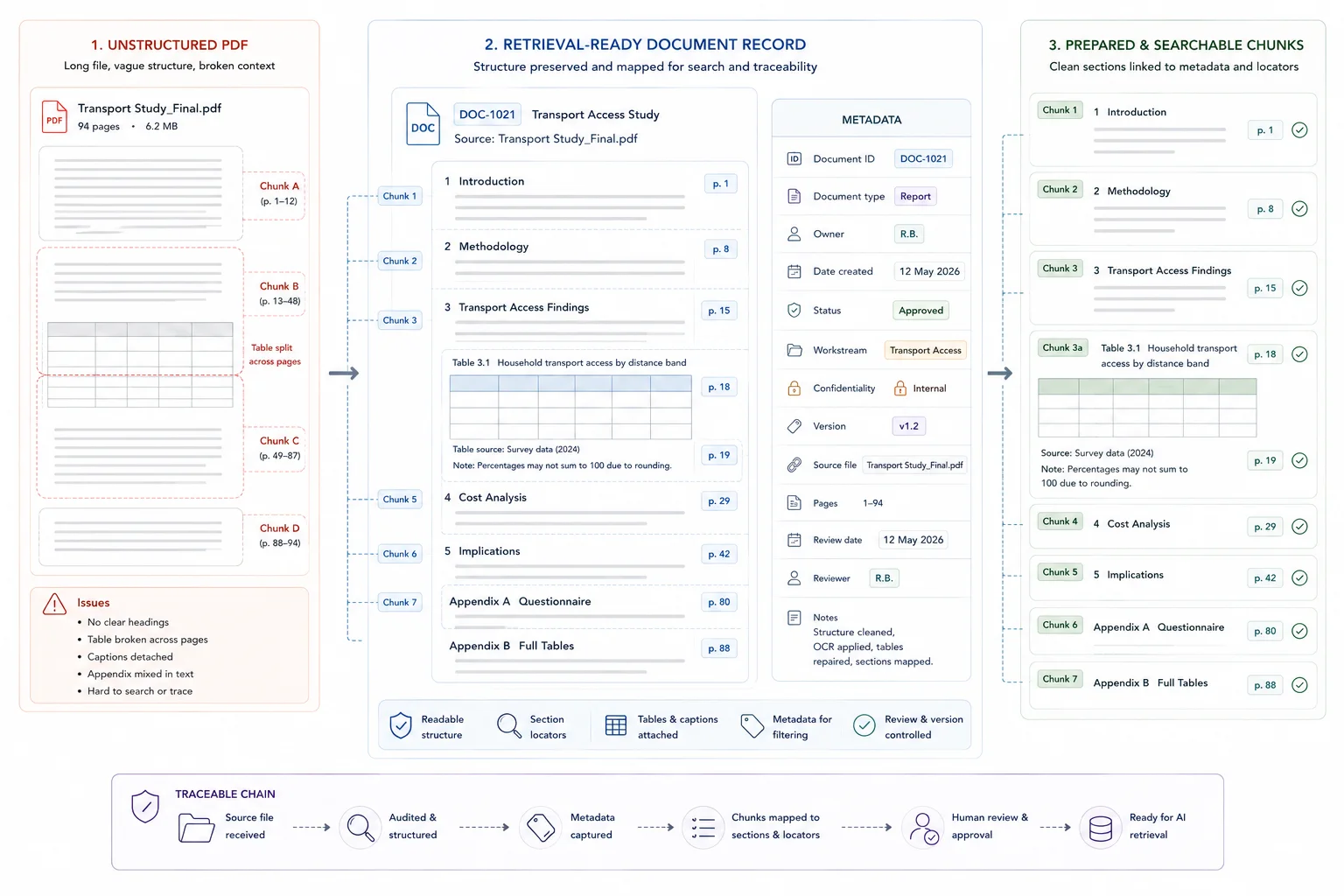
Set replacement rules before the first upload so stale material does not contaminate retrieval.
Decide how the system handles replacements before the first upload. Vertex AI Search's import guidance is useful here because incremental refresh can add new documents and replace existing ones with updated documents that share the same ID. That is the operational model most teams need: stable IDs, clear current-version rules, and no ambiguity about what the live index should return.
Set rules for:
- what counts as the current version
- where superseded files go
- whether archived material stays searchable
- how draft files are labelled
- when a document keeps the same ID and when it gets a new one
- who can approve replacements
If you skip this, retrieval results start mixing current documents with stale ones. That becomes especially expensive once the document set feeds reporting, recommendations, or client-ready outputs.
Apply record-level hygiene to workbooks so the retrieval layer sees rows and fields, not visual clutter.
Tabular files need their own prep rules. A workbook that makes sense to a human reader can still be weak retrieval material if it mixes summary notes, blank spacer rows, screenshots, merged cells, and several unrelated tables on one sheet.
OpenAI's spreadsheet guidance is a strong baseline: use descriptive first-row headers in plain language, keep one row per record, avoid multiple sections or tables in a single sheet, remove empty rows and columns, and do not rely on images that contain critical facts.
For live projects, also:
- split raw data, lookup tables, and reporting views into clearly named sheets
- keep one unit of analysis per row
- avoid burying status or ownership in cell colour alone
- move notes that matter into explicit columns
- export critical tabs to CSV when that makes ingestion cleaner
That kind of sheet hygiene is also what makes later insight work easier, because the structure is already close to a decision-ready evidence base. It is also one practical example of the same clutter problem described in The Real Cost of Messy Evidence Workflows.
Test whether the prepared material answers real questions with usable trace-back before you scale anything.
Before you scale, test the prepared set against real questions. Ask the system to retrieve source material, filter by metadata, return the current version, and point back to the paragraph, table, or row that supports the answer.
Check:
- whether OCR text is usable
- whether headings and chunk boundaries preserve meaning
- whether filters return the right subset
- whether stale versions are excluded
- whether tables survive parsing well enough to answer real questions
- whether humans can verify the source quickly
This is the moment to measure what changed: search time, source-check success, answer usefulness, and where the system still fails. The UNICEF Zambia case study is a useful proof point here. Structure-first preparation made later querying and reporting materially faster.
From here, the next step is not more uploads. It is using the prepared evidence more effectively in search, drafting, review, and decision support. That is the same move described in Decision-Ready Insight: Turning Raw Information into Decision-Ready Work.
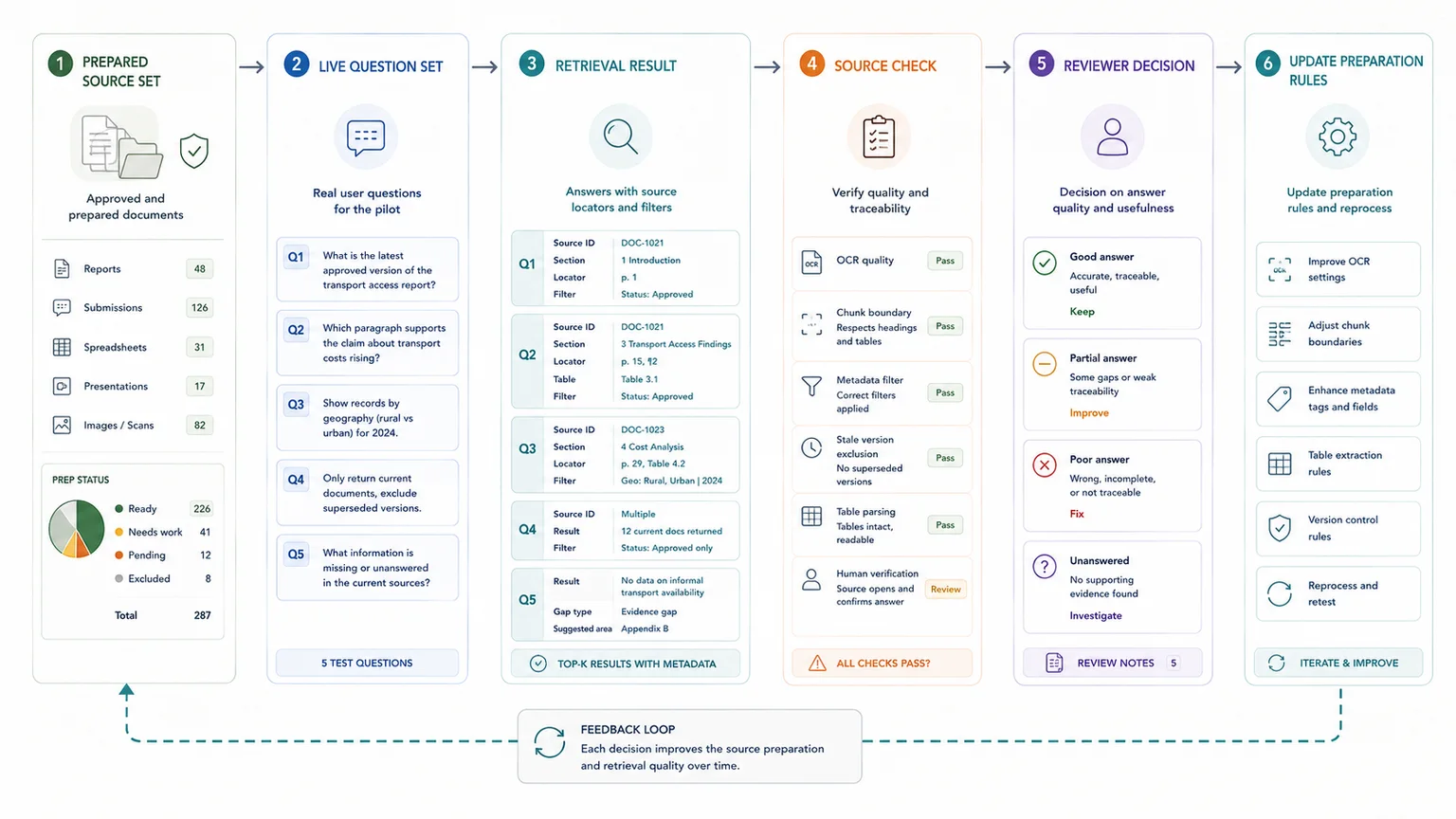
What strong preparation makes easier later
Once the preparation layer is in place, several downstream jobs become easier:
- faster internal search and question answering
- cleaner source traceability during drafting and review
- better filtering by theme, workstream, owner, or status
- safer use of custom AI on top of internal material
- less rework when the same evidence base feeds reports, briefings, and recommendations
Document prep becomes workflow design
This is why document preparation belongs in the same conversation as database architecture, reporting workflows, and decision support. By the time the team wants cleaner outputs, the quality of the preparation layer already shapes what is possible.
Related guides
These adjacent guides are useful when this workflow needs a tighter next step: source register, source-linked evidence table, metadata fields for AI retrieval. Also see why AI gives weak answers, source traceability.
When a simple setup is enough
- The source set is small and low risk
- Only one team uses the material
- Basic cleanup and folder rules are enough to improve retrieval
When you need a more structured system
- The source base affects client work, public information, or operational decisions
- Documents need access rules, update rules, and answer traceability
- Several teams own or update the knowledge base
Common mistakes to avoid
Uploading everything because more content feels safer
More content can make retrieval worse if the extra files are old, duplicated, or irrelevant. Start with approved source material.
Ignoring document status
AI retrieval needs to know whether a document is current, draft, superseded, or archived. Status labels matter.
Preparing documents without testing retrieval
Document cleanup should be checked against real questions. If the system cannot find the right answer, the source structure still needs work.
Leaving critical facts inside images
If the only copy of the fact lives inside a chart, screenshot, or scanned annexure, retrieval quality usually drops before the question is even asked.
Merging unlike documents into one upload
Large bundles with unrelated sections make chunking noisier and make it harder to retrieve the right answer with the right context.
Treating metadata as optional
Weak metadata forces the system to search one undifferentiated pile instead of narrowing results by type, owner, date, or status.
Keeping draft and current versions together with no rule
When current and superseded files compete in the same live index, the answer may be correct in wording but wrong in version.
Expecting one messy workbook to behave like a clean database
A spreadsheet designed for visual review often needs restructuring before it behaves well in retrieval.
AI retrieval preparation checklist
Use this before adding documents to an AI retrieval system
| Check | Done |
|---|---|
| Duplicate files are removed or marked | |
| Superseded documents are labelled | |
| File names are clear and consistent | |
| Each document has an owner or source | |
| Each document has a date or review status | |
| Content is split into useful sections | |
| Internal-only content is separated from public content |
Related resources
Use these next if the document-prep issue also affects AI retrieval, source traceability, internal knowledge use, or workflow scoping.
- Why AI gives weak answers when source material is messy - use this if you are still diagnosing the problem
- AI-ready knowledge environment - use this if document prep needs to become a governed retrieval setup
- Traceable Evidence Workflow Support - use this if you need help structuring internal source material for AI
- Traceable Evidence Workflow Support - use this if retrieval needs to connect to a wider workflow
- Internal Knowledge Base ROI Calculator - use this to model repeated search and weak retrieval costs
- How to stop losing source traceability - use this if AI answers need source checks
FAQ
What counts as a retrieval-ready document for AI retrieval or internal search?
A retrieval-ready document has searchable text, stable structure, enough metadata to filter and trace it, and a clear status in the version-control rules for both AI retrieval and internal search.
Do all PDFs need OCR before AI retrieval?
No. Digital PDFs with machine-readable text usually do not. Scanned PDFs, image-only pages, and visuals carrying critical facts do need OCR or another way to turn that content into usable text.
Why is metadata worth the effort?
Because metadata helps the system filter by document type, owner, date, status, or workstream instead of searching one large undifferentiated corpus.
Can one messy workbook still be used?
Sometimes, but it usually works better after cleanup. Use one row per record, one clear header row, no mixed sections, and explicit columns for fields that matter to retrieval.
When should a team ask for outside help?
A good point is when document prep has stopped being light cleanup and started looking like system design: mixed formats, version drift, weak metadata, and pressure to build a reliable retrieval layer on top.
How should PDFs and tables be prepared for AI retrieval?
PDFs and tables should be prepared with readable text, clear file names, source IDs, dates, document types, page references, table titles, field descriptions and review status. The aim is to help the retrieval system find the right material and make the answer easier to check.
How do you index PDFs and tables so AI answers stay accurate?
Start by cleaning the source library, removing duplicates, separating draft and approved material, adding metadata, preserving table headings, and keeping a source register. The retrieval layer should not only find content. It should also show where the answer came from.
Final thoughts
Preparing documents for AI retrieval is not cleanup after the real work. It is part of the retrieval system itself.
When the files are readable, structured, versioned, and easy to trace, retrieval becomes more useful for search, drafting, review, and later reporting. When the files are weak, the system spends the rest of the workflow compensating for that weakness.
Sources used in this guide
Used for OCR, layout-aware parsing, and context-aware chunking.
Read sourceUsed for parser capabilities across headings, tables, images, lists, and titles.
Read sourceUsed for metadata filtering and file attributes.
Read sourceUsed for document IDs, incremental refresh, and replacement of updated documents.
Read sourceUsed for spreadsheet preparation rules.
Read sourceUsed for the text-only retrieval limit on GPT Knowledge and Project Files.
Read sourceUsed for structure-aware and semantic chunking guidance.
Read sourceTraceable Evidence Workflow Support
Turn interviews, submissions, case studies, survey comments, documents, and field notes into coded evidence, quote banks, synthesis tables, findings, recommendations, and report-ready outputs.