

An evidence workflow is the operating chain between raw inputs and reporting outputs.
It determines how source material is captured, named, stored, reviewed, synthesised, and carried forward into drafting. When that chain is weak, the team ends up cleaning, checking, and writing at the same time.
This guide explains the operating model. It shows how to define the outputs, structure the evidence base, add review discipline, create a synthesis layer, and make the final reporting stage easier to run.
Quick answer
An evidence workflow for reporting is the structured process that turns raw inputs into reviewed evidence, findings, recommendations, and final reporting outputs. It should define how sources are captured, coded, checked, reviewed, and used in drafts. A good workflow makes reporting faster because claims and decisions are built from organised evidence rather than reconstructed at the end.
Who this guide is for
This guide is for research teams, reporting teams, consultants, public-sector projects, and donor-funded programmes that need evidence-heavy reporting to be clearer and easier to review.
It is especially relevant if you are dealing with:
- Source material is messy, duplicated, or spread across tools
- Report claims are hard to trace back to evidence
- Reviewers ask for repeated checks, clarifications, or late evidence cleanup
It is less relevant if:
- Your reporting is simple, low-risk, and based on a small number of already-reviewed sources
Key takeaways
- Main principle: design the operating chain from capture to output before you choose tools or drafting habits.
- Operational consequence: a working evidence layer and synthesis layer stop teams from cleaning, checking, and writing at the same time.
- Review consequence: once the proof standard is visible early, reporting becomes faster to defend and easier to revise under scrutiny.
What an evidence workflow means
An evidence workflow is the route from raw material to reporting output. It captures sources, gives them structure, applies review checks, and turns the reviewed material into findings, recommendations, and report language.
The chain from inputs to outputs
An evidence workflow is the chain that connects raw inputs to reporting outputs.
That chain usually includes source collection, file storage, record creation, naming rules, data cleaning, categorisation, review checks, synthesis, drafting, and sign-off. In a good setup, each step is clear, easy to repeat, and linked back to the underlying evidence.
This matters in any environment where teams need to produce reports, findings sections, briefing notes, recommendations, or internal summaries from large amounts of source material. Without a workflow, reporting becomes a scramble. With one, the team can move from input to output with far less friction.
What good looks like
| Weak setup | Stronger setup |
|---|---|
| Inputs are collected in ad hoc folders | Inputs are captured with source IDs, type, owner, and status |
| Themes are applied differently by each person | Coding or categorisation rules are documented and reviewed |
| Draft claims are hard to check | Each claim connects back to source extracts or evidence records |
| Reports require late cleanup | Reviewed material feeds the draft from the start |
Where this fits in the wider workflow
| Workflow stage | What happens |
|---|---|
| Input | Interviews, datasets, submissions, monitoring records, reports, notes, and source documents |
| Structure | Source IDs, coding rules, evidence records, workflow stages, ownership, and status fields |
| Review | Quality checks, source checks, analysis review, drafting review, and approval |
| Output | Report-ready findings, recommendations, dashboards, response matrices, and final reports |
Why reporting breaks down when information is messy
In many projects, the problem is not a lack of information. The problem is poor structure.
Teams collect interviews, focus group notes, submissions, survey results, internal records, technical documents, and workshop material over weeks or months. Yet the inputs do not sit in one clean system. One team member uses one format. Another uses a different one. Files are renamed halfway through the project. Draft findings sit far away from the source base.
That creates slow reporting, weak traceability, and repeat work. The writer has to rebuild the evidence trail while drafting. Reviewers ask where a claim came from. Someone starts searching across folders and emails. The report slows down, and confidence in the final output drops. If this is already happening, you can check what the reporting bottleneck may be costing before rebuilding the chain.
A good evidence workflow solves that at the source. It gives the team a shared method for storing, reviewing, and using information from the start.
Steps overview
- Define the outputs, review pressure, and proof standard
- Map your source material and who owns it
- Build a usable evidence base
- Set rules for capture, review, and quality checks
- Create a synthesis layer between raw data and the report
- Draft reports from structured evidence, not scattered notes
- Turn findings into decision-ready outputs
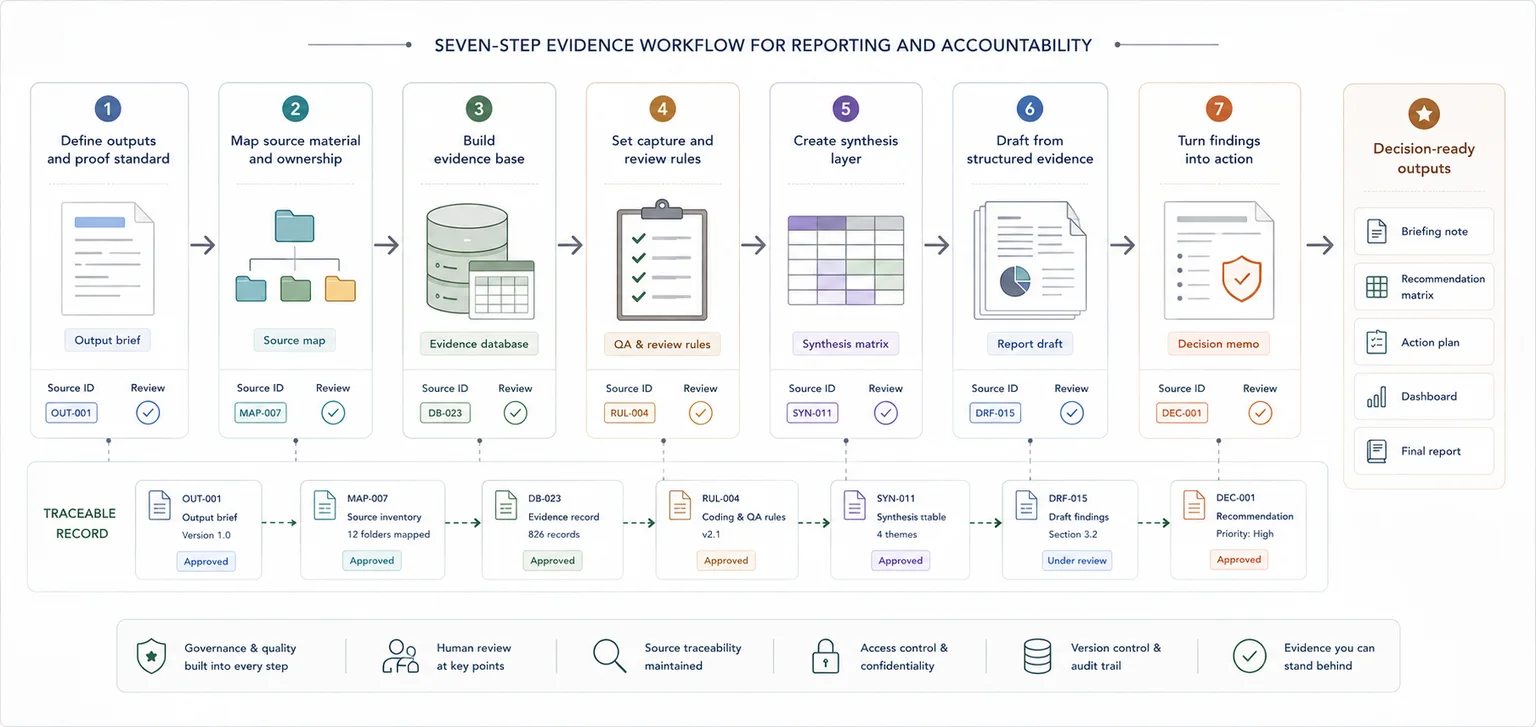
Define what the team has to produce, how hard it will be reviewed, and what each output needs to prove.
Before you build the workflow, define what the team has to produce, how closely it will be reviewed, and what each output needs to prove.
That may include:
- donor reports
- board packs
- findings sections
- policy briefings
- technical summaries
- evaluation reports
- recommendation papers
- management updates
List those outputs first. Then map what each one needs.
Ask:
- What questions must this output answer?
- What level of source traceability is needed?
- What kind of evidence is allowed to support each claim?
- Who reviews the draft before sign-off?
- What format does the final output need to follow?
This step keeps the workflow tied to a real job. A source register or database is only useful when it supports the reporting work that sits at the end of the chain.
Make the source base visible before you try to improve it.
Once the outputs are clear, map the material that feeds them.
This often includes:
- interview notes
- focus group records
- workshop notes
- case studies
- surveys
- spreadsheets
- stakeholder submissions
- internal records
- financial data
- technical reports
- field notes
- email inputs
For each source, note:
- what it is
- where it lives
- who owns it
- how often it changes
- whether it is still active
- whether it needs review, cleaning, or coding
This step usually exposes the real bottleneck. Teams often find that the source base is fragmented, duplicated, or hard to trust. That is a workflow issue, not just a writing issue.
Turn the source map into a working system the whole team can follow.
Now turn the source map into a working system.
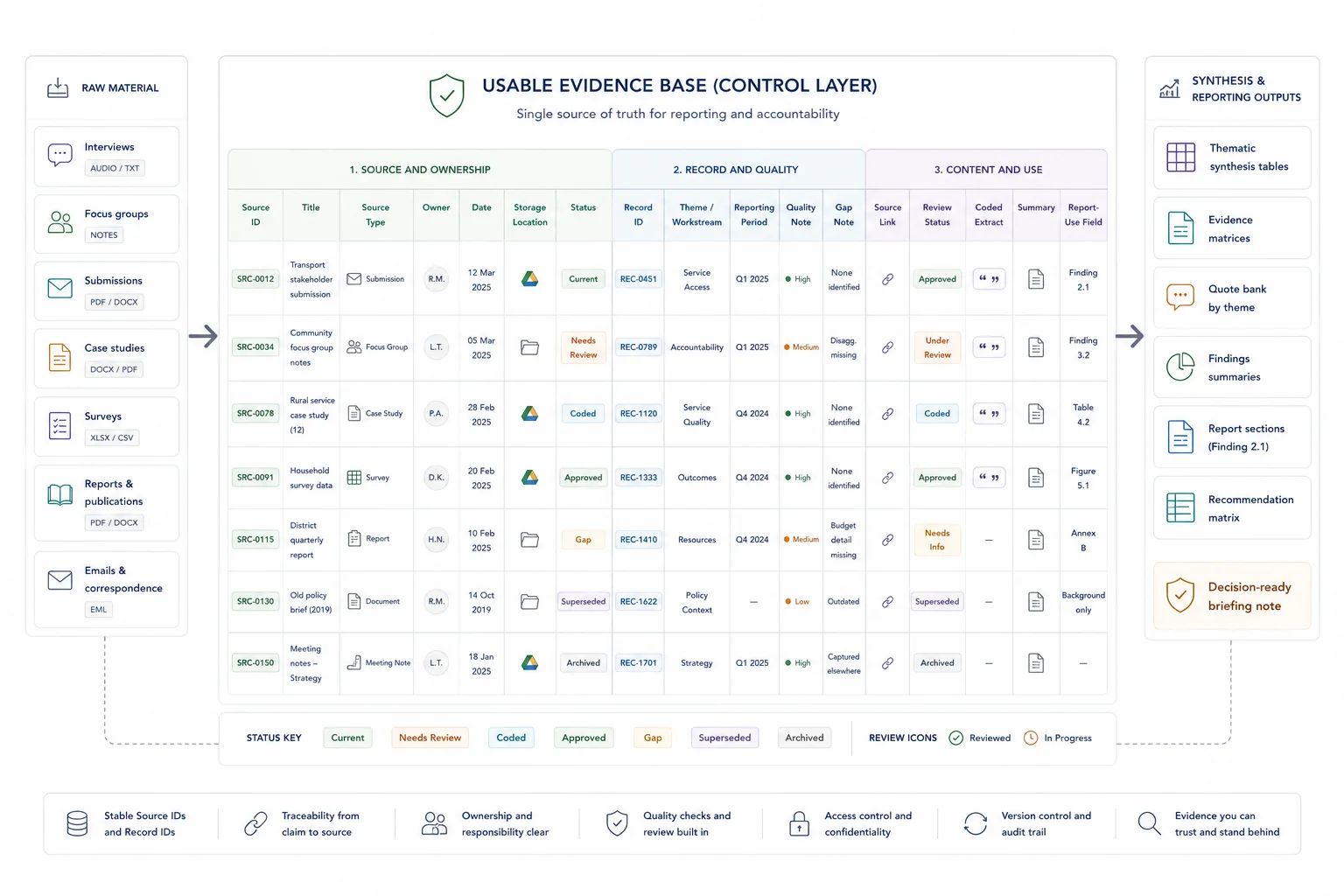
At a minimum, your evidence base should include a source register and a record structure that the whole team can follow. This can sit in a spreadsheet, a database, or another shared system. What matters most is not the platform. It is the logic.
A simple source register can include:
- source ID
- title
- source type
- owner
- date
- location
- status
- linked theme or workstream
- reporting period
- notes on quality or gaps
If the project includes repeated units such as submissions, interviews, cases, or activities, give each one a record ID too. That single move makes source tracking far easier later.
Keep the system practical. Teams should be able to enter information correctly, find what they need quickly, and trace a report statement back to the material behind it without a long search. If you are reshaping the underlying system as well as the workflow, this is where database architecture for evidence and reporting workflows usually start.
Create a small set of standards that keeps records usable across the team.
A workflow breaks down fast when people capture information in different ways.
Set a small set of rules that the team follows from day one. These can cover:
- required fields
- date format
- naming rules
- missing data markers
- status labels
- theme labels
- source link format
- version control
Then add a review routine. This does not need to be heavy. A short quality pass can check:
- missing fields
- duplicate records
- broken source links
- unclear summaries
- conflicting figures
- records placed under the wrong theme
- draft findings with no source backing
The goal is to catch weak records early. That saves far more time than leaving every issue for the reporting stage.
Build the middle layer that turns raw material into something the writer can use.
This is where many teams save the most time. This guide only frames the role of the synthesis layer; the deeper method choices belong in the source-traceability, stakeholder-submissions, and report-writing guides.
Raw inputs should not go straight into a final report. There needs to be a middle layer where the evidence is grouped, summarised, and made easier to use. That is your synthesis layer.
This can include:
- coded records
- theme summaries
- evidence tables
- issue trackers
- finding sheets
- summary tabs linked to source IDs
- short memos by theme or workstream
The synthesis layer gives the report writer something stable to work from. Instead of digging through raw notes, they can work from grouped evidence that has already passed a first review.
This is where messy information starts becoming usable. Patterns become easier to spot. Gaps stand out. Repeated issues rise to the surface. The team can move from raw material to findings with much more control. If you want the wider operational view of what weak structure costs, The Real Cost of Messy Evidence Workflows is a useful adjacent read.
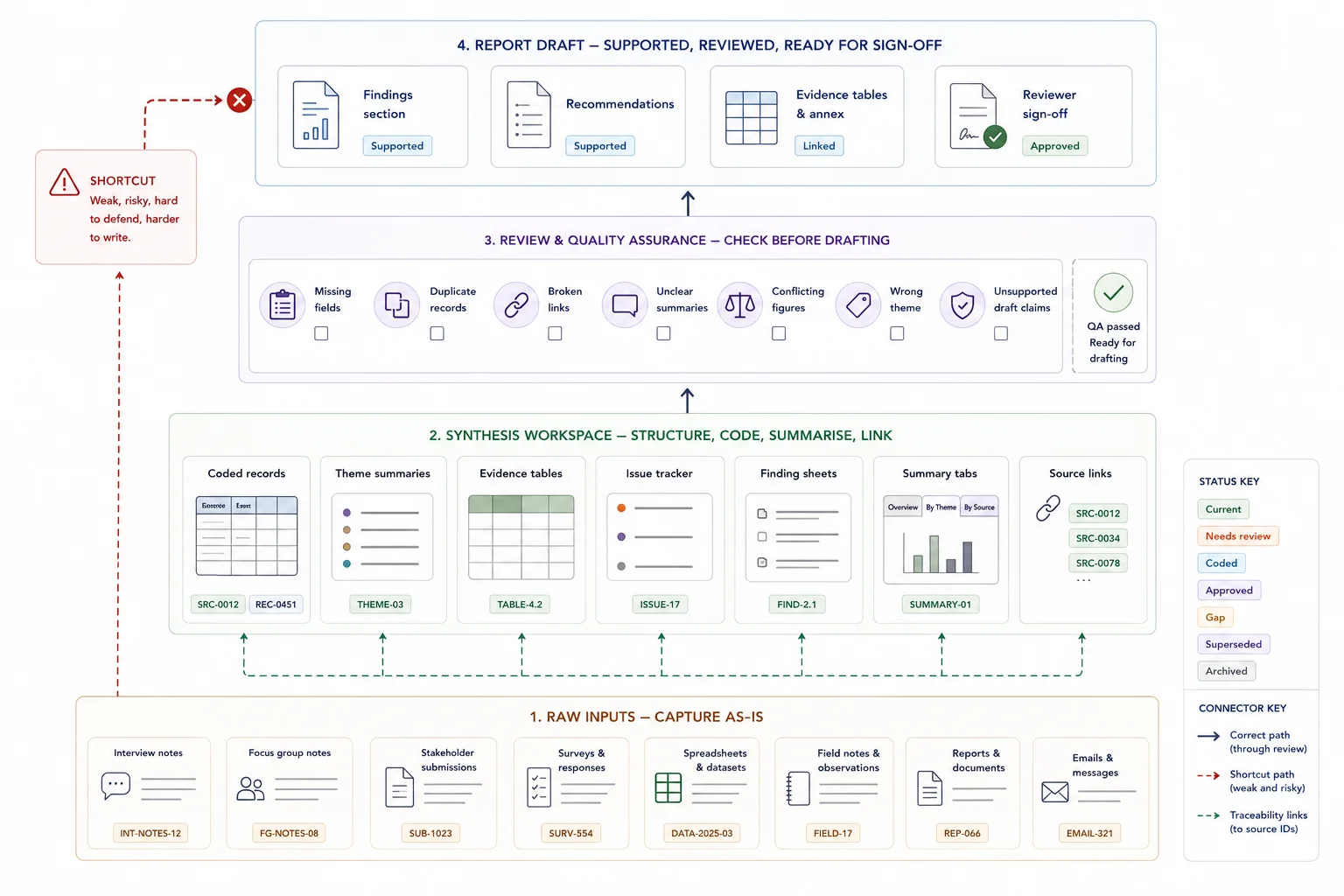
Make the draft stage a writing job, not a search-and-rebuild job.
At this stage, the workflow should already have done the heavy lifting. The drafting team should be writing from prepared evidence assets, not reconstructing the logic of the project from raw notes and folders.
At this stage, the writer should not be pulling from random folders, email chains, and half-finished notes. They should be working from structured evidence outputs that already link back to source material.
A clean drafting process often looks like this:
- each report section is linked to a theme, workstream, or question
- each key claim is backed by source-linked evidence
- each summary table or finding sheet feeds a named section
- reviewers can check a statement against the evidence base without a long search
This cuts two common reporting problems: unsupported claims and slow review. It also makes editing easier. If a reviewer questions a statement, the team can move straight back to the underlying source.
If you want to keep exploring adjacent workflow examples, the data collection and workflow systems articles on the blog and the site's case studies both show how structured evidence makes final outputs easier to produce and review.
Move from evidence and findings into something the client, funder, team, or leadership group can act on.
Strong reporting is not just about restating the evidence. It is about making the evidence usable.
Once the draft is built, take one more pass to ask:
- What is the main message here?
- Which issues need action?
- Which risks need flagging?
- Which gaps still need follow-up?
- What should the client, funder, team, or leadership group do next?
This is the step where raw information becomes something people can act on. A good workflow helps the team move from source material to findings, then from findings to recommendations, planning points, or next actions.
That shift matters in research, policy, programme delivery, operations, and internal reporting. It is what turns data work into usable business value. The same pattern also shows up in The Real Cost of Messy Evidence Workflows, especially where weak structure creates rework and review pain.
Where AI fits into the workflow
AI works best after the evidence base is clean.
If the source material is scattered, weakly labelled, or inconsistent, an AI layer often adds noise. Once records have IDs, clear fields, source links, and a stable structure, AI can help with tasks such as:
- faster search
- question answering across the evidence base
- first-pass summarising
- coding support
- retrieval of source-linked material
- quicker review of large document sets
Structure first, then AI
That is the right order: structure first, then AI. A custom AI tool is far more useful when it sits on top of an organised knowledge base rather than a messy folder of documents.
If you want to go deeper on that layer, How to Build an AI-Ready Knowledge Environment for Internal Retrieval shows what that foundation looks like in practice.
Related guides
These adjacent guides are useful when this workflow needs a tighter next step: source register, source-linked evidence table, quote bank, reporting workflow. Also see source traceability.
When a simple setup is enough
- The evidence base is small and reviewed by one person
- The report has low external scrutiny
- A simple source list and draft outline are enough
When you need a more structured system
- The evidence base is large, mixed, or high risk
- Several people need to capture, code, review, and draft from the same material
- The final output needs to be defensible to clients, funders, public bodies, or boards
Common mistakes to avoid
Designing the report before designing the evidence flow
A clean report outline helps, but it will not fix weak evidence capture. Make sure the source material can support the report structure.
Skipping coding rules
If each analyst categorises material differently, the synthesis becomes inconsistent. Keep coding rules visible and review them.
Reviewing only the final draft
Evidence issues are cheaper to fix before the final draft. Build checks into extraction, analysis, and drafting.
Building around the tool instead of the output
A new platform will not fix a weak process on its own. Start with the reporting job, then build the workflow around it.
Skipping record IDs
Without IDs, source tracking becomes harder with every new input.
Letting each contributor capture information differently
Small differences in format lead to large cleanup jobs later.
Mixing raw notes and final copy in the same place
That creates confusion over what is source material and what is already interpreted.
Leaving quality checks until the end
Late cleanup slows drafting and weakens confidence in the final output.
Adding AI before the data structure is sound
That often creates faster confusion rather than faster review.
Evidence workflow audit checklist
Use this to check whether your evidence workflow can support reporting
| Check | Done |
|---|---|
| Inputs are captured consistently | |
| Source IDs are stable | |
| Coding or categorisation rules are defined | |
| Review responsibilities are clear | |
| Draft claims can be traced back to evidence | |
| Report outputs are generated from reviewed material |
Related resources
Use these next if the reporting workflow needs a service route, diagnostic calculator, proof point, or more specific guide.
- Evidence Insight Reporting Engine - use this if you need a structured evidence-to-reporting system
- Traceable Evidence Workflow Support - use this if evidence needs to be organised before reporting
- Data Use, Reporting & Communication Systems - use this if the output needs to become a clear report
- Reporting Bottleneck Cost Calculator - use this to estimate slow reporting costs
- The real cost of messy evidence workflows - use this if you need to diagnose the business cost
- How to stop losing source traceability - use this if claims are hard to verify
FAQ
What are evidence workflows for reporting?
Evidence workflows for reporting are the steps a team uses to collect, organise, review, synthesise, and draft from source material in a structured way.
Do I need special software to build an evidence workflow?
No. Many teams can start with a shared folder, a clean spreadsheet, naming rules, record IDs, and a short review routine.
Who needs an evidence workflow?
Any team working with large volumes of source material and recurring reporting pressure can benefit from one. That includes contractors, research teams, policy teams, operational teams, and organisations with messy information environments.
How is this different from monitoring and evaluation?
Monitoring and evaluation often sit inside the wider workflow. An evidence workflow covers the full path from raw input to reporting output, including source structure, quality checks, synthesis, drafting, and traceability.
When should AI be added?
Add AI after the source base is organised. It works far better when the records, fields, and source links are already stable.
Final thoughts on building evidence workflows for reporting
A good evidence workflow does not make one stage faster by pushing confusion into the next stage. It gives the team a stable chain from capture to output.
If the current process still depends on people remembering where things are, rebuilding logic during drafting, or checking source routes late in review, the workflow is doing too little. Fix the chain first, then improve the specialist stages inside it.
Traceable Evidence Workflow Support
Turn interviews, submissions, case studies, survey comments, documents, and field notes into coded evidence, quote banks, synthesis tables, findings, recommendations, and report-ready outputs.