

Most teams do not need an internal AI assistant first. They need a retrieval environment that can answer the same questions reliably every time.
That means knowing which sources are live, how records are named, what metadata filters matter, who can access what, and how a user moves from a retrieved passage back to the source. When those controls are weak, search slows down, review gets heavier, and any AI layer sits on shaky ground.
This guide is about retrieval architecture. It shows how to define the question set, shape the source base, choose the retrieval layer, and put governance around access and output use.
Quick answer
An AI-ready knowledge environment is a governed source base that lets AI retrieve useful answers from approved internal material. It is more than a chatbot. It needs current documents, clear ownership, useful metadata, access rules, retrieval rules, human review for higher-risk outputs, and a way to show where answers came from.
Who this guide is for
This guide is for organisations, consultants, research teams, and service businesses that want AI to answer internal questions from trusted source material.
It is especially relevant if you are dealing with:
- Your documents are spread across folders, drives, chat threads, and old versions
- People ask the same questions repeatedly because internal knowledge is hard to find
- You need AI answers that can be traced back to approved sources
It is less relevant if:
- You only need a simple public website chatbot that does not rely on sensitive internal material
Key takeaways
- What this page helps with: defining the retrieval questions, governance choices, and source boundaries that an internal retrieval environment has to support.
- Who it is for: teams with a live internal corpus that need repeatable search, controlled access, and a clearer route from retrieved passages back to source.
- What changes when it is done well: retrieval gets faster, review gets lighter, and any later AI layer sits on a governed structure instead of a loose file pile.
AI assistant vs AI-ready knowledge environment
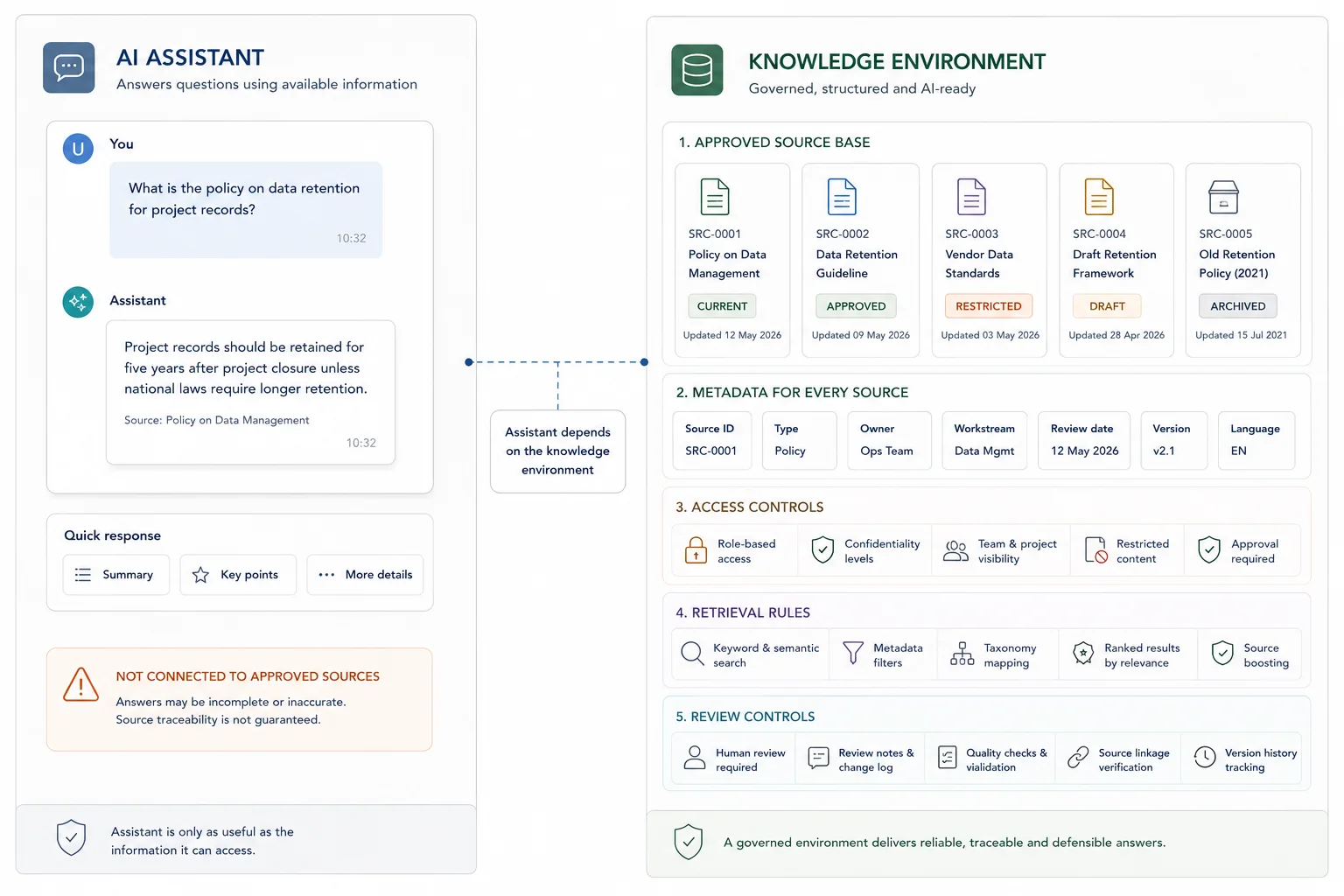
An AI assistant is the interface people use. The knowledge environment is the source structure behind it. Without the source structure, the assistant may look useful but still answer from messy or outdated material.
| AI assistant | AI-ready knowledge environment |
|---|---|
| Chat interface or search experience | Approved source base, metadata, ownership, and retrieval rules |
| Answers user questions | Controls what material can be retrieved and checked |
| Can be changed quickly | Needs governance, update rules, and review responsibilities |
| Visible to the user | Mostly invisible, but determines answer quality |
What good looks like
| Weak setup | Stronger setup |
|---|---|
| AI searches whatever documents are available | AI retrieves from approved, current, and labelled sources |
| Ownership is unclear | Each source has an owner, review date, and update rule |
| Answers are hard to verify | Answers show source references and limits |
| Internal and public content are mixed | Access rules separate sensitive, internal, public, and draft content |
Where this fits in the wider workflow
| Workflow stage | What happens |
|---|---|
| Input | Internal knowledge files, policies, procedures, reports, FAQs, templates, and source documents |
| Structure | Source ownership, metadata, access rules, status labels, retrieval rules, and update responsibilities |
| Review | Answer testing, source checks, governance review, human review rules, and maintenance checks |
| Output | Internal AI knowledge base, traceable answers, faster search, and clearer knowledge workflows |
Before you start
This process is a strong fit for:
- primary contractors handling submissions, interviews, workshop notes, or mixed evidence inputs
- research, evaluation, and policy teams working across many source documents
- programme teams with reporting pressure and weak source traceability
- organisations that already hold valuable internal knowledge but lose time searching for it
You do not need a perfect system on day one. You do need a clear scope, a real use case, and a willingness to fix weak structure before asking AI to work on top of it.
Why the source environment matters
The environment behind an AI assistant is what determines whether people can find, trust, and trace the answer.
An AI-ready knowledge environment is not just a folder structure with a chatbot attached. It is the combination of source design, metadata, retrieval logic, access rules, and review controls that lets a team retrieve material with confidence.
That usually includes a clear folder or repository structure, stable naming rules, usable metadata, a working taxonomy, version control, source links, and records that are clean enough for search, synthesis, and reporting. In plain terms, it means your team can find what it needs, trust what it finds, and trace outputs back to source material.
This matters even if you never build a chatbot or internal assistant. Better structure improves manual search, speeds up drafting, and reduces review pain on its own. If the team needs to justify the work internally, you can model the return on an internal retrieval layer before deciding how much tooling is needed. If you later add an AI retrieval layer, the results are usually far better.
Steps overview
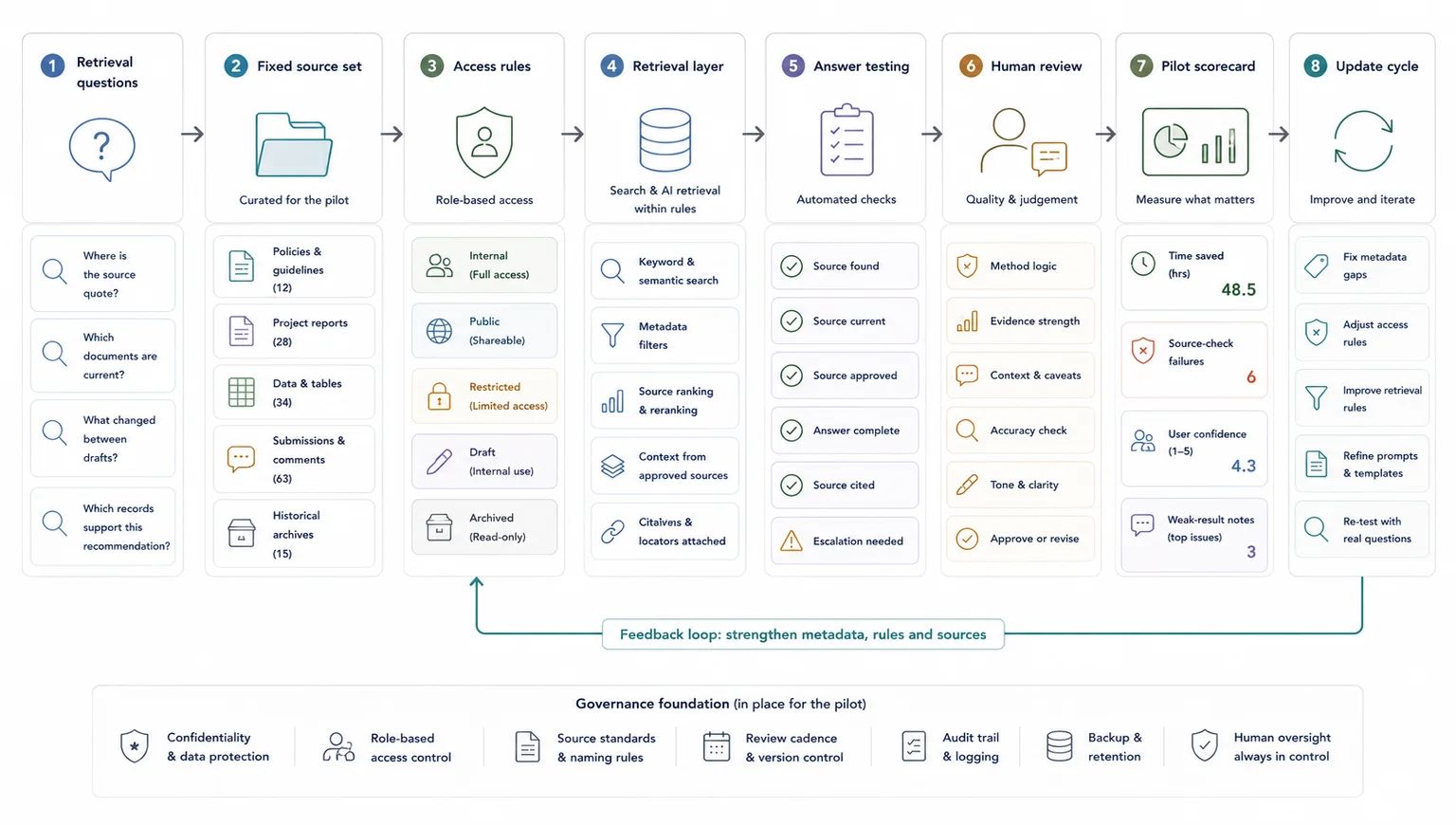
- Define the retrieval questions the environment has to answer
- Audit the material you already have
- Set a simple structure your team can keep using
- Add taxonomy and metadata that match real work
- Prepare documents for retrieval, not just storage
- Choose the right retrieval layer
- Put governance around access, review, and output use
- Pilot on one live workflow and measure what changes
Write down the recurring retrieval questions first so the environment is shaped around real use.
Write down the recurring retrieval questions first, because the environment should be designed around those questions rather than around a generic AI use case.
Good examples include:
- Which submissions mention this issue?
- Where is the source quote behind this finding?
- What changed between draft one and draft two?
- Which interview records support this recommendation?
- What evidence do we already have on this theme?
This step matters because weak AI projects often begin with a tool purchase instead of a workflow problem. A better starting point is a short list of repeat retrieval tasks that currently waste time, create rework, or slow reporting.
By the end of this step, you should have:
- five to ten recurring retrieval questions
- the teams or roles that ask them
- the source materials those questions depend on
- a sense of how often those questions come up
Map the current information environment before you try to improve it.
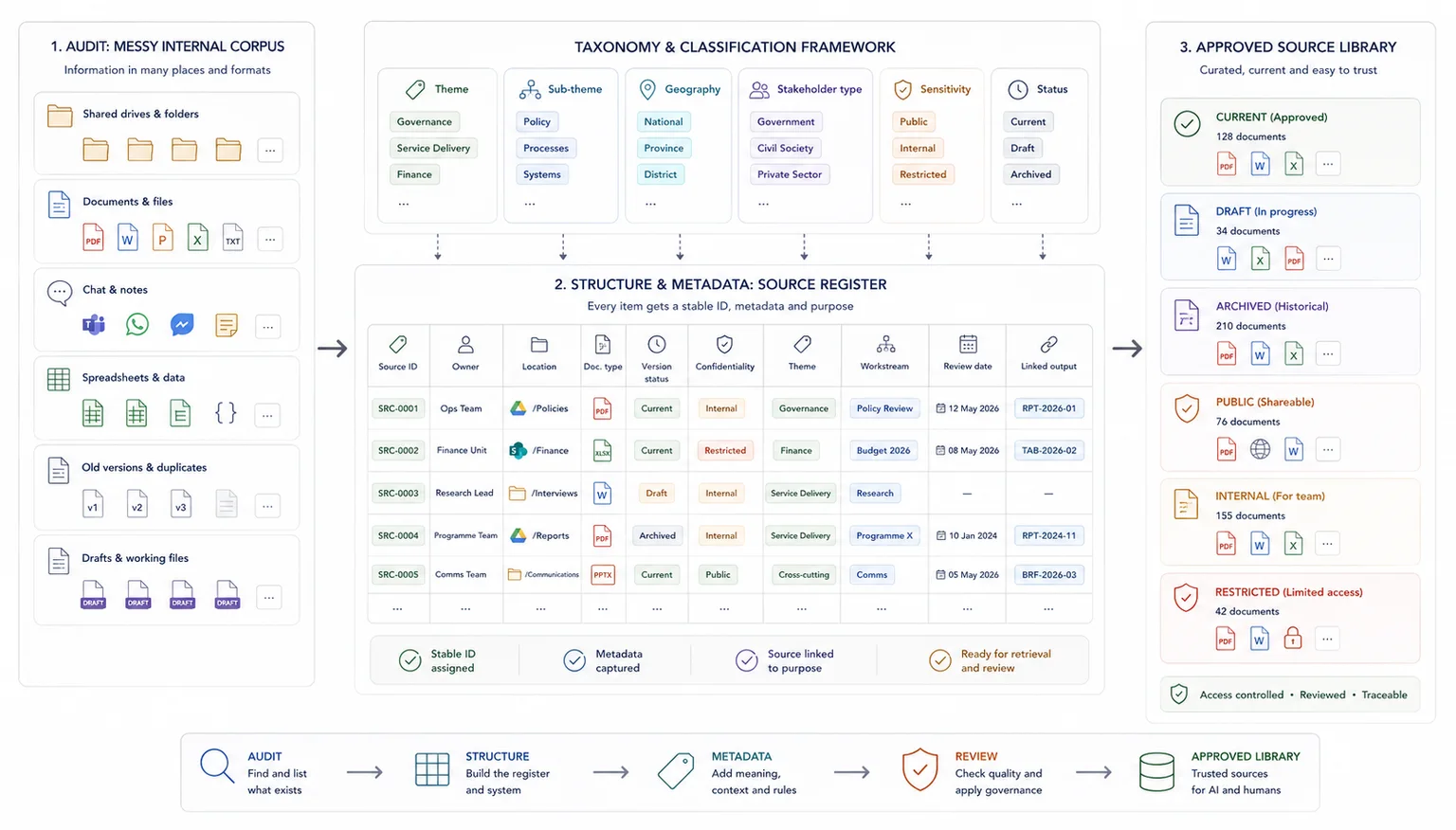
List the main document types, where they live, who owns them, how they are named, and whether they are clean enough for reuse. This can include spreadsheets, PDFs, Word documents, meeting notes, forms, slide decks, transcripts, internal records, submissions, and draft outputs.
At this stage, the aim is not to clean everything. The aim is to see what is there, what is duplicated, what is missing, and what causes friction.
Useful audit fields include:
- document type
- source or owner
- location
- date range
- format
- version status
- confidentiality level
- whether it is still active
- whether it has usable metadata
- whether it links cleanly to later outputs
This is often the point where teams realise the issue is wider than search. The real issue is usually weak structure, weak naming, and weak traceability.
Build an operating structure the team can keep current under real workload pressure.
For many teams, this starts with a cleaner folder model, a source register, shared naming rules, and a core spreadsheet or database that tracks records consistently. For larger projects, it may move into a fuller database or knowledge repository.
Keep the structure plain enough for everyday use. If your team cannot keep it updated, the system will decay fast.
A good baseline includes:
- one agreed location for active source material
- one source register with IDs
- one naming standard for files and versions
- one set of status labels
- one clear owner for updates and QA
This is also where you decide what the system of record is. That does not mean one file for every task. It means one agreed place where the core record lives.
Tag records in the same language people use when they search, draft, and review.
That usually means adding fields such as:
- source ID
- project or workstream
- theme
- sub-theme
- geography
- stakeholder type
- date
- document type
- status
- sensitivity level
- linked output or report section
Do not build a taxonomy that reads well on paper but fails in live work. Use the language your team already uses when it searches, drafts, reviews, and reports.
A short, stable taxonomy is better than a huge one nobody applies consistently. Start with the fields that support your main retrieval questions, then expand only when the need is clear.
Make the source base clean enough for both human reviewers and retrieval systems to work from reliably.
Document preparation matters here because a retrieval environment depends on clean source material. This section only covers the environment-level implication. For OCR, parsing, spreadsheet hygiene, and file-level prep rules, use the full document-prep guide.
A folder full of files is not yet a usable retrieval environment.
Your documents need enough consistency for search systems and human reviewers to work from them properly. That often includes:
- removing duplicate files
- splitting mixed bundles where useful
- fixing bad scans
- standardising titles
- keeping dates consistent
- separating source documents from drafts
- storing transcripts or notes in reusable formats
- capturing record-level metadata outside the file name
If the work involves PDFs, tables, or scanned material, note where retrieval may fail without better parsing. If a document holds key charts, tables, or annexures, flag that early instead of assuming a later AI layer will read everything cleanly. Layout-aware parsing and chunking are often worth planning for when the source base is document-heavy.
This step often makes the biggest difference to later retrieval quality.
Match the retrieval approach to the real scale and complexity of the workflow.
Once the material is cleaner, decide how people will retrieve it.
In some workflows, a structured spreadsheet, source register, and disciplined search pattern will do enough. In others, semantic search or an AI knowledge base is worth adding. Semantic retrieval is useful when the team needs concept-level matching rather than exact keyword matches, especially across a large document set, which is exactly the kind of retrieval layer OpenAI describes for semantic search over your data.
A stronger fit looks like this
- the team asks similar knowledge questions every week
- useful material already exists but sits across many files
- manual search is slow
- people need help comparing documents, not just finding one file
- reporting or drafting depends on quick source checks
A weaker fit looks like this
- the source base is tiny
- the content changes too fast for basic governance
- the team has not agreed on core structure yet
- nobody can say what questions the system should answer
If you want to see what this looks like in a live, high-scrutiny workflow, the South African Local Government White Paper case study shows retrieval, drafting support, and evidence traceability working together. For a related article on structuring the evidence layer before reporting, read How to Build Evidence Workflows for Reporting and Accountability.
Add the rules that keep retrieval useful without weakening trust or exposing the wrong material.
This is the step teams skip when they are rushing.
An AI-ready environment needs rules for who can access what, who can add or edit records, how sensitive material is handled, and when outputs need human review. It also needs a clear line between retrieval support and final judgement.
Set rules for:
- access by role or team
- sensitive or restricted content
- review checkpoints for AI-assisted outputs
- source citation or source-link expectations
- version handling
- audit notes when records are changed
If the environment will support drafting or recommendations, make it clear that retrieval is there to support review and writing, not replace subject judgement. Current platform guidance also reinforces document-level access control at retrieval time and treating retrieved passages as untrusted input, which is a sensible default for any live system, not just enterprise builds.
Test the structure and retrieval logic on real work before expanding the system.
Do not start with a full enterprise rollout.
Pick one live workflow where retrieval pain is already obvious. That might be submission review, interview synthesis, donor reporting support, consultation drafting, or evidence checking for a report section.
Run a pilot with:
- a fixed document set
- a short list of retrieval questions
- a named group of users
- a review method for outputs
- a simple scorecard
Track things like:
- time to find source material
- time to answer repeat questions
- number of source-check failures
- user confidence in retrieved outputs
- where the system still returns weak results
The goal is not to prove that AI is magic. The goal is to find out whether the structure, retrieval layer, and review process are strong enough to save time without weakening trust. Evaluation best practices are one of the clearest ways to test reliability, edge cases, and workflow fit before a wider rollout.
When this work is done properly, the result is not we added AI. The result is usually:
- a cleaner information environment
- faster retrieval and querying
- stronger source traceability
- less manual searching
- clearer synthesis inputs
- better reporting flow
- more confidence during review
Related guides
These adjacent guides are useful when this workflow needs a tighter next step: metadata fields for AI retrieval, source register. Also see AI retrieval, why AI gives weak answers, source traceability.
When a simple setup is enough
- The source set is small, current, and low risk
- One team owns the knowledge base
- A light internal search setup answers most questions
When you need a more structured system
- Several teams own or use the source material
- Answers affect client delivery, public communication, or operational decisions
- The system needs source traceability, access rules, and human review
Common mistakes to avoid
Starting with the chatbot interface
The interface is only useful if the source environment behind it is clear. Start with the source base, not the front end.
Leaving ownership undefined
If nobody owns the source material, nobody knows when it becomes outdated. Ownership and review dates are part of the system.
Treating retrieval as a one-time setup
Knowledge environments need maintenance. New files, retired files, and review decisions should change what the AI can retrieve.
AI-ready knowledge environment checklist
Use this before building or improving an internal AI knowledge base
| Check | Done |
|---|---|
| Current documents are separated from outdated files | |
| Source ownership is clear | |
| Internal and public content are separated | |
| Documents have useful metadata | |
| Retrieval rules are defined | |
| Human review is built into high-risk outputs | |
| The system can show where answers came from |
Related resources
Use these next if you need to move from the article into a related workflow, calculator, case study, or service.
- Traceable Evidence Workflow Support - use this if you need help building the source environment
- Traceable Evidence Workflow Support - use this if the knowledge base needs to connect to operational workflows
- How to Prepare Documents for AI Retrieval - use this if source documents still need cleanup
- Why AI gives weak answers when source material is messy - use this to diagnose weak answer quality
- Internal Knowledge Base ROI Calculator - use this to model repeated search and review costs
- How to stop losing source traceability - use this if AI answers need stronger source checks
FAQ
What is an AI-ready knowledge environment?
It is a document and data setup with enough structure, metadata, traceability, and governance for reliable retrieval. That may support manual search on its own or sit under a custom AI knowledge base later.
Do you need a vector database or chatbot to do this well?
No. Many teams get strong gains from cleaning structure, metadata, and source tracking first. An AI retrieval layer becomes more useful once those basics are in place.
What kinds of teams benefit most from this work?
Research teams, evaluation teams, policy and consultation teams, donor-funded programmes, and contractors handling mixed evidence are usually strong fits. The common pattern is a large source base, repeat retrieval needs, and pressure to turn source inputs into credible outputs.
What is the difference between document search and internal retrieval?
Document search helps you find files. Internal retrieval helps you answer working questions across files, records, notes, and evidence with enough context to support drafting, synthesis, or review.
When should a team ask for outside help?
A good moment is when source material is valuable but the team is losing time to searching, rework, weak traceability, or slow reporting. That is often where a short scoping exercise can save a lot of wasted effort later.
Final thoughts
A strong retrieval environment does three things at once: it makes the source base easier to search, makes review easier to control, and gives any later AI layer something reliable to sit on.
If the current problem is weak retrieval across a live internal corpus, start by defining the question set, the source boundaries, the metadata logic, and the access rules. That tells you whether the fix is mostly structural, mostly governance-related, or ready for a retrieval layer.
Traceable Evidence Workflow Support
Turn interviews, submissions, case studies, survey comments, documents, and field notes into coded evidence, quote banks, synthesis tables, findings, recommendations, and report-ready outputs.