

Messy evidence workflows rarely look dramatic from the outside. They look busy.
Inside the work, though, they create the same pattern every cycle: repeated searching, late cleanup, duplicated figures, weak version control, slow review, and more time spent reconstructing the chain than using it. If that pattern is familiar, you can estimate the time lost to repeated searching and review before deciding where to intervene.
This article is a diagnostic guide. It shows the signs that the workflow is breaking, why those problems keep coming back, and what kind of redesign usually fixes them.
Quick answer
The real cost of messy evidence workflows is the time lost to searching, rechecking, rebuilding source trails, reconciling versions, and fixing reports late in the process. The visible problem may be slow reporting, but the deeper issue is usually weak structure around source material, review ownership, version control, and evidence-to-output handoffs.
Who this guide is for
This guide is for research teams, reporting teams, consultants, nonprofits, public-sector projects, and donor-funded teams that feel the cost of messy information in deadlines, review cycles, and repeated checking.
It is especially relevant if you are dealing with:
- People spend time looking for the right source or version
- Claims, figures, and findings are checked repeatedly
- Final reports need late-stage evidence cleanup
It is less relevant if:
- The workflow is already structured and the main issue is simply a temporary capacity shortage
Key takeaways
- Sign: when the workflow looks busy but depends on repeated searching, late cleanup, and fragile version control, the system is already breaking.
- Cost: reporting pain usually shows up late, but the waste started much earlier in the evidence chain.
- Fix: review the workflow as a system problem, not a staffing problem, then rebuild the structure, standards, and proof routes underneath it.
What messy evidence workflows cost
Messy evidence workflows create costs that are easy to miss because they look like ordinary project work. If this is already affecting delivery, use the Reporting Bottleneck Cost Calculator to estimate the time and fee impact before redesigning the workflow.
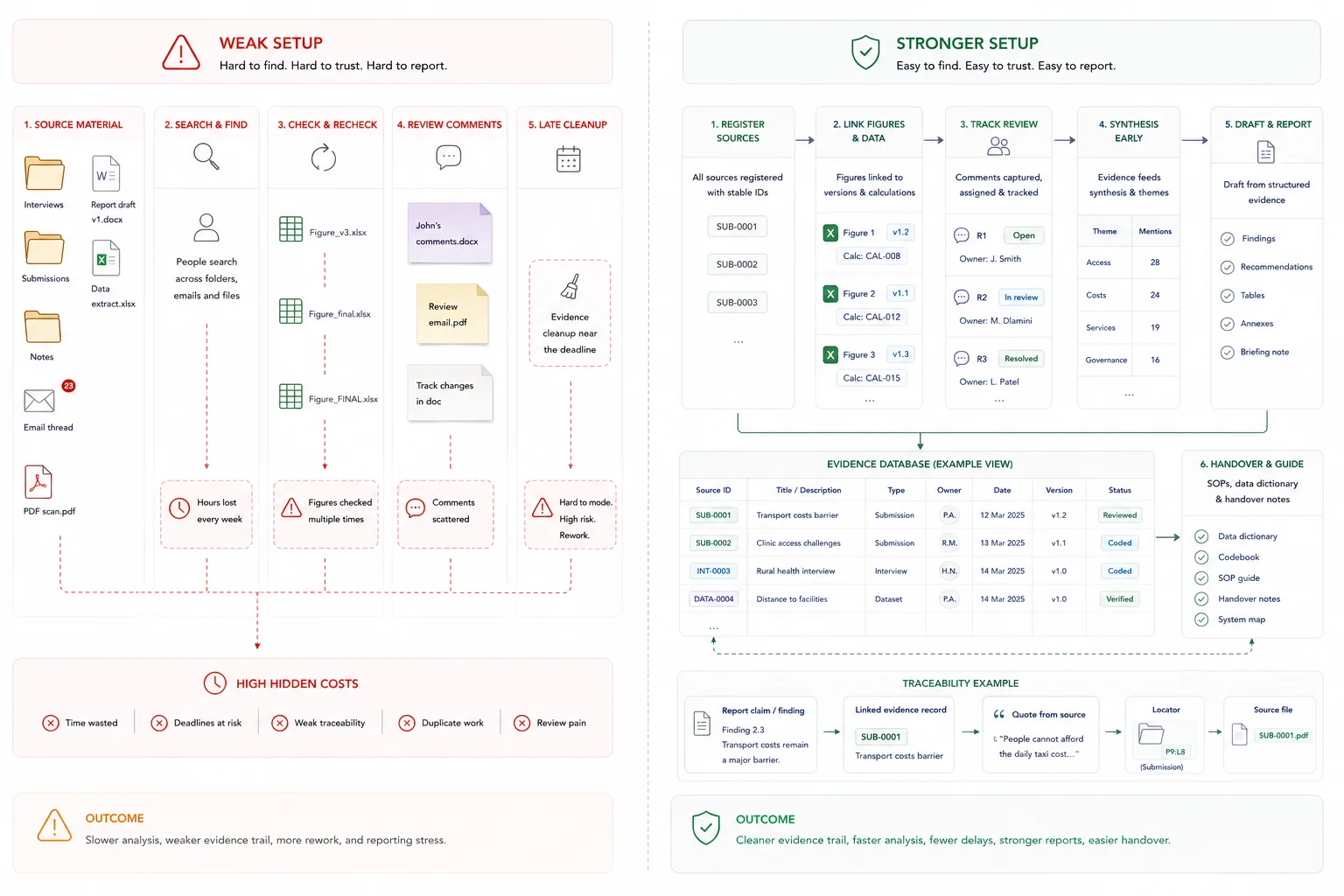
What good looks like
The practical shift is from memory, file drift, and late-stage cleanup to a workflow people can follow and check.
| Weak setup | Stronger setup |
|---|---|
| People search folders and old drafts for sources | Source material is registered with stable IDs, status, and owners |
| Figures are checked repeatedly | Figures have source, version, calculation, and review notes |
| Review comments are scattered | Review questions, owners, and status are tracked in one place |
| Reports need late evidence cleanup | Reviewed evidence feeds drafting from the start |
What a better workflow looks like in practice
A better workflow usually has a few shared traits.
First, there is a clear intake layer. Inputs come in with IDs, dates, statuses, and consistent field logic.
Second, there is one usable evidence layer. Core records, source links, coded issues, and retrieval logic stay aligned.
Third, standards are visible. The team has naming rules, version rules, source notes, and QA checks that people can actually follow.
Fourth, reporting is shaped early. The evidence base is built with the final output in mind, whether that output is a dashboard, synthesis note, briefing pack, board report, or review-heavy final report.
Fifth, handover is built in. The system is usable by the team after the build, not only by the person who set it up.
When to rebuild your workflow
You should probably review the workflow when the same numbers appear in multiple places, when reporting depends on one or two people remembering how things fit together, when review comments keep exposing source gaps, or when each reporting cycle feels like starting from scratch.
Those are signs that the team does not need one more patch. It needs a cleaner system design.
A good scoping conversation usually starts with five questions:
- What outputs matter most?
- What level of review or scrutiny do those outputs face?
- What data already exists, and where does it live now?
- Where are the current breakpoints?
- What level of traceability does the team need?
Where this fits in the wider workflow
| Workflow stage | What happens |
|---|---|
| Input | Source documents, datasets, interviews, submissions, reports, notes, and drafts |
| Structure | Source register, evidence fields, version rules, review ownership, and output mapping |
| Review | Claim checks, figure checks, version checks, reviewer decisions, and sign-off |
| Output | Cleaner reports, faster review, lower rework, clearer decisions, and reusable evidence systems |
What a broken evidence workflow looks like
A broken evidence workflow is a setup where information can be collected, yet cannot be reused cleanly. Files move, names change, logic sits in people’s heads, and reports get built by stitching fragments together near the deadline.
Spreadsheet chaos is doing work a database should do
Spreadsheets are useful for quick analysis, lightweight tracking, and small operational tasks. Trouble starts when they become the system of record for evidence handling, review, and reporting.
At that point, the real problem is not only formula mistakes. It is version drift, hidden assumptions, copied tabs, weak audit trails, and no stable single source of truth. Operational spreadsheet research helps explain why those risks grow quickly once spreadsheets start behaving like production systems.
This is usually a sign that a database job is being forced into a spreadsheet shape. If the workflow needs IDs, field rules, validation, status tracking, source links, and traceable outputs, the team needs more structure than a loose workbook can safely carry.
A good fix is not always “replace spreadsheets.” In many teams, the better move is to keep spreadsheets where they still help, then add the missing layer: schema, field definitions, QA logic, and source-linked traceability through database architecture for evidence and reporting workflows.
See the UNICEF child poverty study evidence workflow for a schema-first model that stayed spreadsheet-friendly while adding traceability and QA.
Burnout is often a workflow design problem
When teams spend large parts of the week searching for files, switching between apps, re-entering the same information, and chasing status updates, fatigue builds long before the real analysis or writing starts.
That strain often gets framed as a people problem. In practice, it is often a design problem. Too many handoffs, too many storage points, and too many manual checks create a constant low-level drag that drains attention.
This is one reason overloaded reporting cycles feel worse than they should. The deadline is not the full story. The system has already taxed the team for days or weeks before the deadline arrives, which fits the broader pattern in Microsoft’s 2025 Work Trend Index that many people lack enough time or energy to do their work.
Better workflow design does not remove hard work. It removes avoidable rework.
Knowledge loss happens when process lives in people, not systems
If the workflow only works because one person knows the naming logic, the coding rules, or the reporting sequence, the team does not yet have a stable system. It has a dependency.
That creates two problems. First, new staff take longer to get productive because they learn through guesswork, shadowing, or old email threads. Second, outputs become inconsistent because people rebuild the process differently each time.
This is where documentation matters. A usable data dictionary, shared file rules, SOPs, review notes, and handover material keep the work moving when roles change. That is exactly the kind of continuity documenting organizational knowledge is meant to protect.
On this site, that idea already sits inside database architecture support around QA, governance, and handover-ready delivery. They are not extra polish. They are part of making the system usable after delivery.
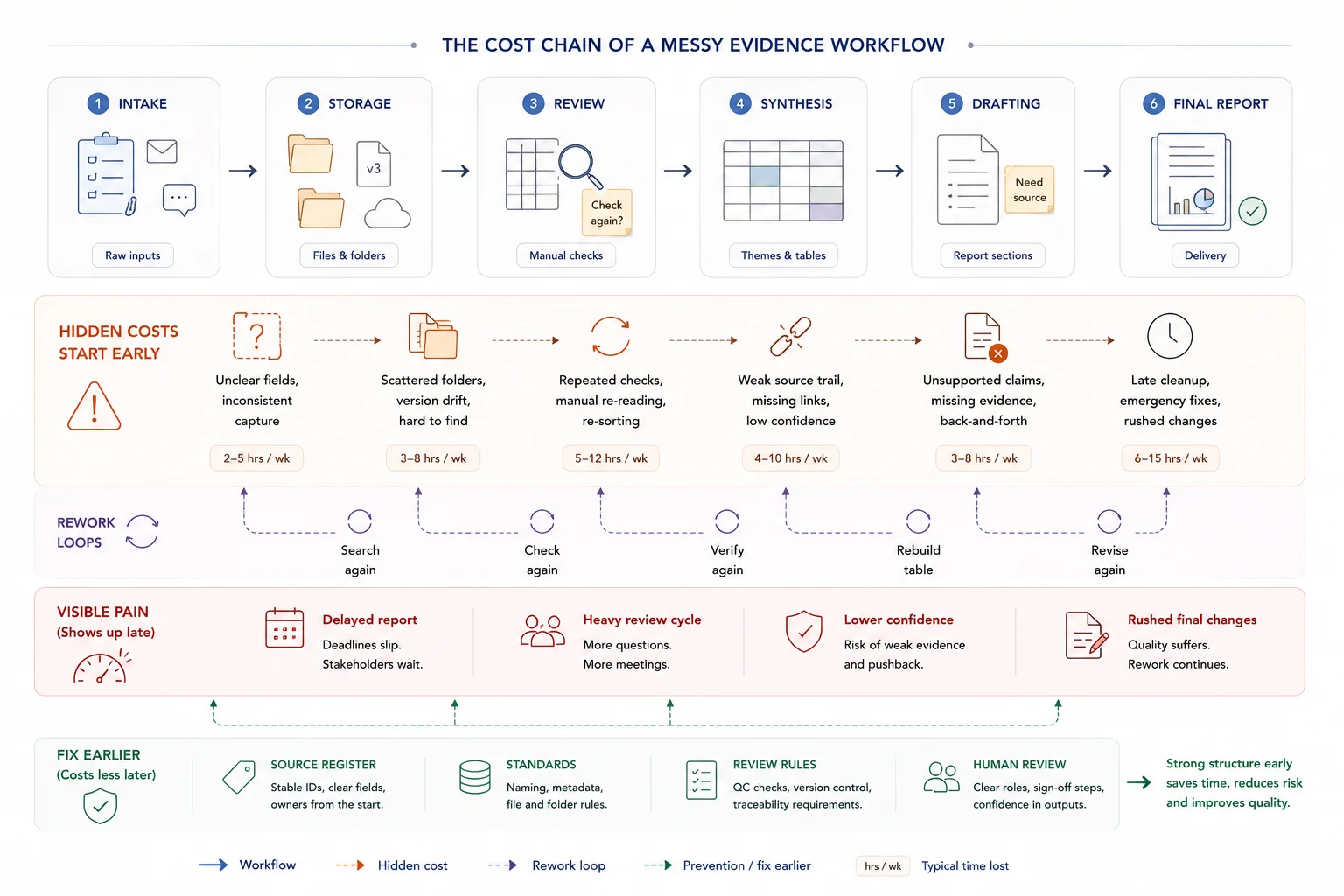
Why reporting starts to hurt
Teams often say reporting is the problem. In many cases, reporting is just where the system failure becomes visible. The real issue began much earlier, when inputs were captured loosely, stored in separate places, or reviewed without shared rules.
Tool sprawl breaks flow and fragments evidence
Tool sprawl looks productive from the outside. A form tool here, a notes app there, a shared drive, a project board, a spreadsheet tracker, a reporting doc, and a few chat threads to hold the rest together.
Inside the workflow, that often means duplicate entry, broken review chains, and evidence that lives in separate places with no clean path back to source. Teams then export, paste, reconcile, and repeat the same checks across systems that were never designed to work as one. That is the practical shape of data silos.
Once that pattern takes hold, the team loses flow. People spend more time moving information around than using it.
This is where a single working evidence base matters. Not one giant file for everything, but one agreed operating layer where the core records, statuses, source links, and reporting logic can stay aligned.
Reporting feels painful when evidence is not structured early
Reporting gets painful when teams try to impose structure at the end. Source material arrives in mixed formats. Notes are useful but inconsistent. Quotes are saved without context. Status fields are missing. The draft report starts before the evidence base is shaped for retrieval.
That is when review turns heavy. Writers cannot pull what they need cleanly. Analysts reopen source files to verify basic points. Senior staff spend time checking claims that should already be traceable.
A better pattern starts much earlier. Inputs are tagged with shared rules. Records are linked back to source. Quotes are stored with enough context to be reused. Findings are built from an evidence layer that already matches the shape of the output.
The site’s strongest proof pages already show this. In the UNICEF child poverty study evidence workflow, the system kept the team in a familiar spreadsheet environment and added the missing pieces: schema, quote-per-claim logic, QA, and traceability. In the Local Government White Paper case study, the value came from turning a high-volume submission process into a traceable evidence base that could support synthesis and drafting.
No shared standards means no consistent outputs
Shared standards sound small until a team has to defend a finding, reproduce a table, or explain which version of a file fed the final report.
Without shared rules, file names drift, folders become personal, fields get renamed, versions multiply, and review comments apply to different drafts at the same time. That is how teams lose confidence in their own reporting chain.
The fix is not glamorous. It is naming rules, version logic, a source register, field definitions, review checkpoints, and clear provenance for how outputs were built. That includes systematic and consistent file naming.
This is also where “single source of truth” needs care. It does not mean one file for every task. It means one agreed source for the core records and one documented path from source material to reporting output.
Firefighting mode is usually the result, not the root cause
Firefighting mode feels like the problem because it is the part everyone sees. The late nights, the last-minute checks, the repeated requests, the rush to fix version issues before something goes out.
Most of the time, that is the result of a weaker stack underneath: messy intake, scattered storage, tool sprawl, undocumented process, and output logic that arrives too late.
Adding more people on top of that setup may help for a short stretch. It rarely fixes the cause. The friction stays in place and reappears at the next reporting cycle.
Related guides
These adjacent guides are useful when this workflow needs a tighter next step: source register, reporting workflow, source-linked evidence table, decision-ready insight. Also see source traceability.
When a simple setup is enough
- The workflow is small and one person controls the source material
- The output is low risk and not repeatedly reviewed
- A simple tracker solves the current search and version issues
When you need a more structured system
- The same evidence is reused across reports, decisions, or teams
- Review cycles are slow because claims and sources are hard to check
- The cost of repeated searching, checking, and cleanup is now material
Common mistakes to avoid
Treating the cost as admin time
Search, checking, and rework are part of delivery cost. If they happen repeatedly, the workflow is costing more than it appears.
Fixing the final report instead of the evidence flow
A final rewrite may rescue one output, but it will not solve the underlying source and review problems.
Waiting until a deadline to clean the evidence
Late cleanup creates pressure and weakens review. Structure the evidence base before drafting accelerates.
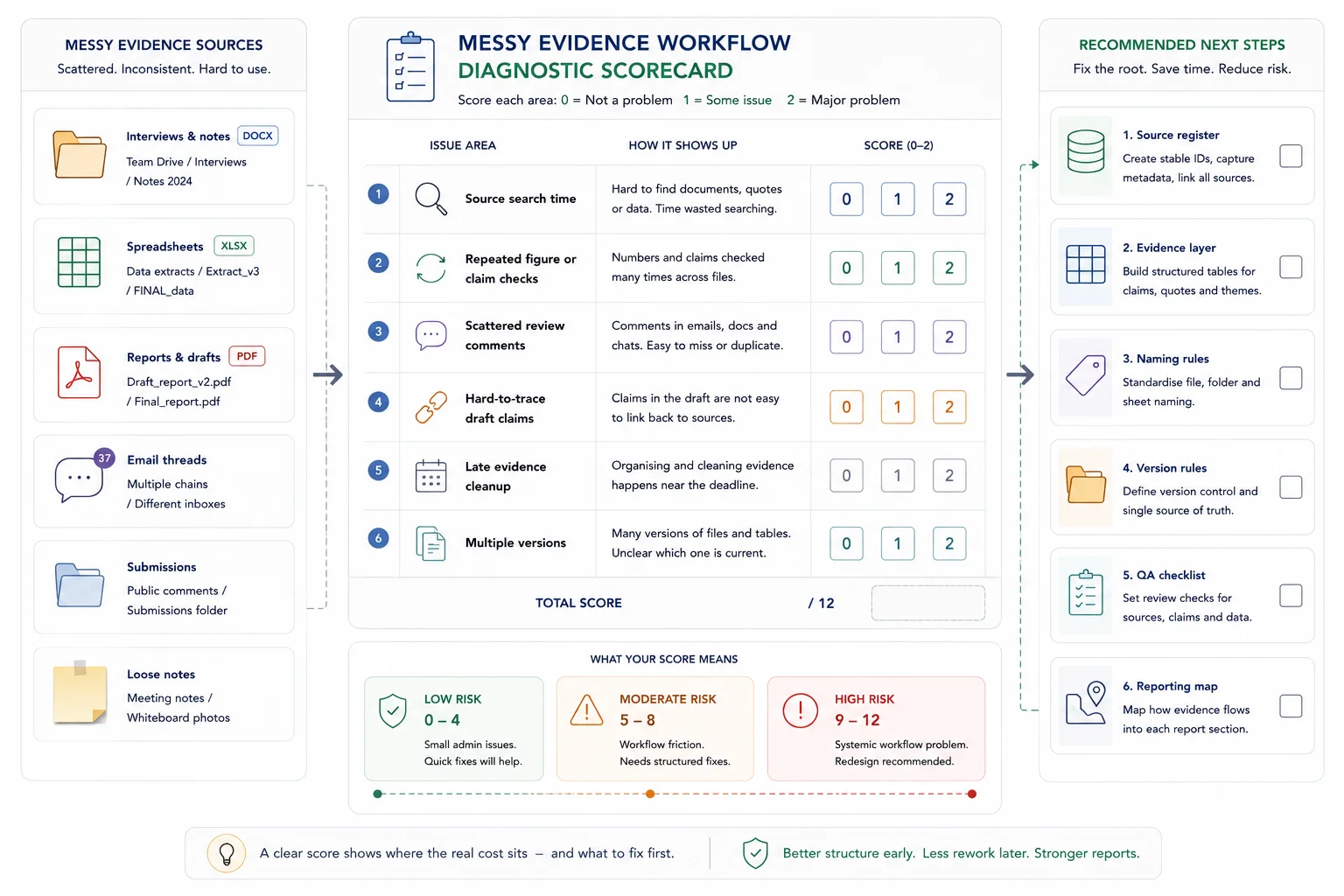
Messy evidence workflow diagnostic scorecard
Score each item from 0 to 2. 0 means the issue is rare. 1 means it happens sometimes. 2 means it happens often.
Diagnostic scorecard
| Issue | Score |
|---|---|
| People spend time looking for the right source | |
| Figures or claims are checked repeatedly | |
| Review comments live in different places | |
| Drafts contain claims that are hard to trace | |
| Final reports require late-stage evidence cleanup | |
| Different teams use different versions of the same material | |
| 0 to 3 | Low risk |
| 4 to 7 | Moderate risk |
| 8 to 12 | High risk |
Related resources
Use these next if the cost described above needs to be traced into a calculator, service route, proof point, or practical workflow guide.
- Reporting Bottleneck Cost Calculator - use this to estimate the cost of slow review and rework
- Search and Review Time Savings Calculator - use this to estimate time lost looking for information
- Evidence Insight Reporting Engine - use this if messy evidence needs a structured reporting system
- Traceable Evidence Workflow Support - use this if the source material needs to be organised first
- Evidence workflows for reporting - use this for the practical workflow design
- How to stop losing source traceability - use this if the hidden cost is repeated proof-checking behind claims
FAQ
When is a spreadsheet enough?
A spreadsheet is enough when the workflow is small, the logic is easy to inspect, the file has one clear owner, and the output does not need a heavy audit trail. Once the work needs IDs, validation, linked records, status tracking, source traceability, or repeat reporting under review, the team usually needs more structure than a loose workbook can safely carry.
What does “single source of truth” mean in this article?
It means one agreed source for the core records that feed reporting. It does not mean forcing every task into one file. Teams can still use different tools, but the main evidence layer, status logic, and source links need one stable home.
Do we need AI to fix a messy evidence workflow?
No. The first fix is workflow architecture. AI can help later with tagging, retrieval, coding support, or synthesis support, yet it works best when the intake, schema, standards, and QA checks are already in place.
What is the cost of a messy evidence workflow?
The cost is the time lost to repeated searching, cleaning, checking, rebuilding tables, resolving version issues and answering review questions that should have been easier to trace.
Why do evidence workflows become expensive late in the project?
The visible cost often appears during drafting and review, but the problem usually starts earlier when source IDs, field rules, review statuses, version control and evidence links were not set up.
Fix the workflow before the next reporting cycle
If the same reporting cycle keeps producing the same scramble, treat that as a workflow signal rather than a staffing problem.
The next useful step is a workflow review: what the outputs are, where the core records live, where version drift starts, what the review pressure looks like, and which part of the chain is carrying too much hidden work.
Traceable Evidence Workflow Support
Turn interviews, submissions, case studies, survey comments, documents, and field notes into coded evidence, quote banks, synthesis tables, findings, recommendations, and report-ready outputs.