

A website form can look clean, ask sensible questions, and still fail to produce new business.
That does not always mean the form is the problem. The bigger issue is often what happens after someone clicks submit.
A form captures the enquiry. It does not decide who should respond, how quickly they should reply, whether the lead is a good fit, what context the sales team needs, or what follow-up should happen if the prospect does not answer.
That work belongs to the lead process behind the form.
Quick answer
A website form is not enough if the lead process behind it is broken. The form captures the enquiry, but it does not manage ownership, qualification, routing, reminders, follow-up, or outcomes. A better lead process turns every submission into a structured record with source, service interest, urgency, owner, status, next step, and result, so the business can see what happens after the form is submitted.
Who this guide is for
This guide is for service businesses, consultants, specialist firms, and small teams that receive website enquiries but do not have a reliable process behind the form.
It is especially relevant if you are dealing with:
- Enquiries land in a shared inbox
- Lead ownership, status, and follow-up depend on memory
- You cannot connect form submissions to calls, quotes, proposals, or revenue
It is less relevant if:
- You already have a well-managed CRM with clear routing, status tracking, and outcome reporting
Key takeaways
- Quick answer: a website form is not enough if the lead process behind it is broken because the form only captures the enquiry.
- A better lead process connects the form to a structured workflow that stores the lead, routes it, prioritises it, supports a fast response, creates the next task, and records the outcome.
- The useful measure is not only form submissions. It is what happened after the form was submitted.
The real problem is the lead data structure
A form submission is only useful if it becomes a structured lead record. Without fields for source, service interest, urgency, owner, status, next step, and outcome, the business cannot see what is happening after the form is submitted. AI, automation, and CRM tools will not fix the process if the underlying lead data is vague.
What a structured lead record should capture
Without fields for source, service interest, urgency, owner, status, next step, and outcome, the business cannot see what is happening after the form is submitted.
This is why the article sits closer to structured information systems than generic CRM advice. The issue is the handoff between intake, records, routing, follow-up, and reporting. A cleaner data structure lets the team search, assign, prioritise, automate, and review leads instead of relying on inboxes and memory.
Why this matters after the first response
Enquiries go to a shared inbox, nobody owns the lead, first response is slow, form data is copied manually, follow-up depends on memory, lead source is unclear, and the team cannot connect form submissions to calls, quotes, proposals, or revenue.
If AI is being considered for lead summaries or routing, the same rule applies as it does in knowledge base work: AI will not fix a vague form, messy database, or unclear CRM process. For the source-quality version of that problem, read Why AI Gives Weak Answers When Source Material Is Messy.
What good looks like
| Weak setup | Stronger setup |
|---|---|
| Form submissions go to one inbox | Every submission creates a structured lead record |
| The first person to notice the email owns the response | Routing rules assign an owner based on service, urgency, or source |
| Follow-up depends on memory | Next steps and reminders are tracked in the system |
| Lead quality is judged informally | Qualification fields show fit, value, timing, and service interest |
| The team cannot report on outcomes | Status and result fields connect enquiries to calls, proposals, and closed work |
Where this fits in the wider workflow
| Workflow stage | What happens |
|---|---|
| Input | Website form submissions, referral enquiries, calls, emails, and campaign leads |
| Structure | Lead fields, owner rules, qualification stages, source tracking, follow-up tasks, and CRM status |
| Review | Response-time checks, owner review, pipeline review, and outcome tracking |
| Output | Clear lead records, follow-up queue, pipeline view, proposal list, and revenue attribution |
The form is the intake point
A website form should not be treated as the full lead system. It is the intake point. The system is what happens behind it.
Why the lead process matters
Research published in Harvard Business Review as The Short Life of Online Sales Leads found that many companies were not responding fast enough to online enquiries. The MIT and InsideSales lead response study also found that the odds of contacting and qualifying a web-generated lead drop sharply during the first hour.
So the question is not only: is our website form converting?
The better question is: what happens to the lead after the form is submitted?
The lead workflow behind the form
A proper lead workflow usually includes several layers. Without these layers, the business is usually relying on inboxes, memory, and manual admin.
That may work when there are only a few enquiries a month. It becomes unreliable when more leads come in, more people handle sales, or the buying process has several steps.
This is where the form needs to feed a structured database or workflow, not just send an email. A database gives each lead a usable record. A workflow decides what happens next. A CRM or tracker gives the team visibility.
Lead workflow layers
| Layer | What it does |
|---|---|
| Form | Collects the enquiry |
| Lead database | Stores the enquiry as a structured record |
| Qualification fields | Helps separate urgent, strong, weak, and poor-fit leads |
| Routing rules | Sends the lead to the right person or team |
| Notification | Alerts the right person quickly |
| Follow-up task | Creates the next action |
| CRM or tracker status | Shows where the lead sits |
| Outcome tracking | Records whether the lead was booked, quoted, won, lost, or nurtured |
What a broken lead process looks like
A broken lead process does not always look broken from the outside. The website may still generate enquiries. The sales team may still reply to some of them. The CRM may still contain contacts.
The problem is inconsistency.
Common signs include form submissions going to a shared inbox, no clear owner for each enquiry, slow first replies, salespeople asking for details the form should have captured, leads being copied manually into spreadsheets, no standard qualification process, no follow-up task after the first reply, no record of why a lead was won or lost, and marketing tracking submissions while sales tracks conversations separately.
If nobody can say how many website leads became calls, quotes, proposals, or customers, the business is not managing leads properly. It is only counting form fills.
Response time and handoff
When someone fills in a website form, they are usually in an active decision-making moment. That intent can fade quickly.
Why response time matters
The MIT and InsideSales lead response study reviewed web-generated leads and call attempts across multiple companies. It found that the odds of calling to contact a lead decreased by more than 10 times in the first hour, while the odds of calling to qualify a lead decreased by more than 6 times in that same period.
The lesson is not that every business needs to call every lead within seconds. The lesson is that silence is expensive.
A fast first response can be a confirmation email, a useful reply from a real person, a booking link, a call from the right team member, or a message explaining what will happen next. The lead should not feel like the form disappeared into a void.
What should happen immediately after submission
For a high-intent lead, the first few minutes should not be empty.
A good process can trigger a confirmation message to the prospect, a new lead record in a CRM or database, a notification to the right person, a short summary of the enquiry for the sales team, a follow-up task with a clear deadline, a booking link or reply template, and a status update showing that the lead is waiting for first response.
This is where automation helps. It should not replace the sales conversation. It should remove the admin that delays the sales conversation.
Salesforce describes CRM automation as a way to handle repetitive manual tasks such as creating contacts, scheduling meetings, creating reminders, sending emails, creating sales quotes, and arranging service calls. That is the practical value of automation in a lead process.
Weak handoff vs better handoff
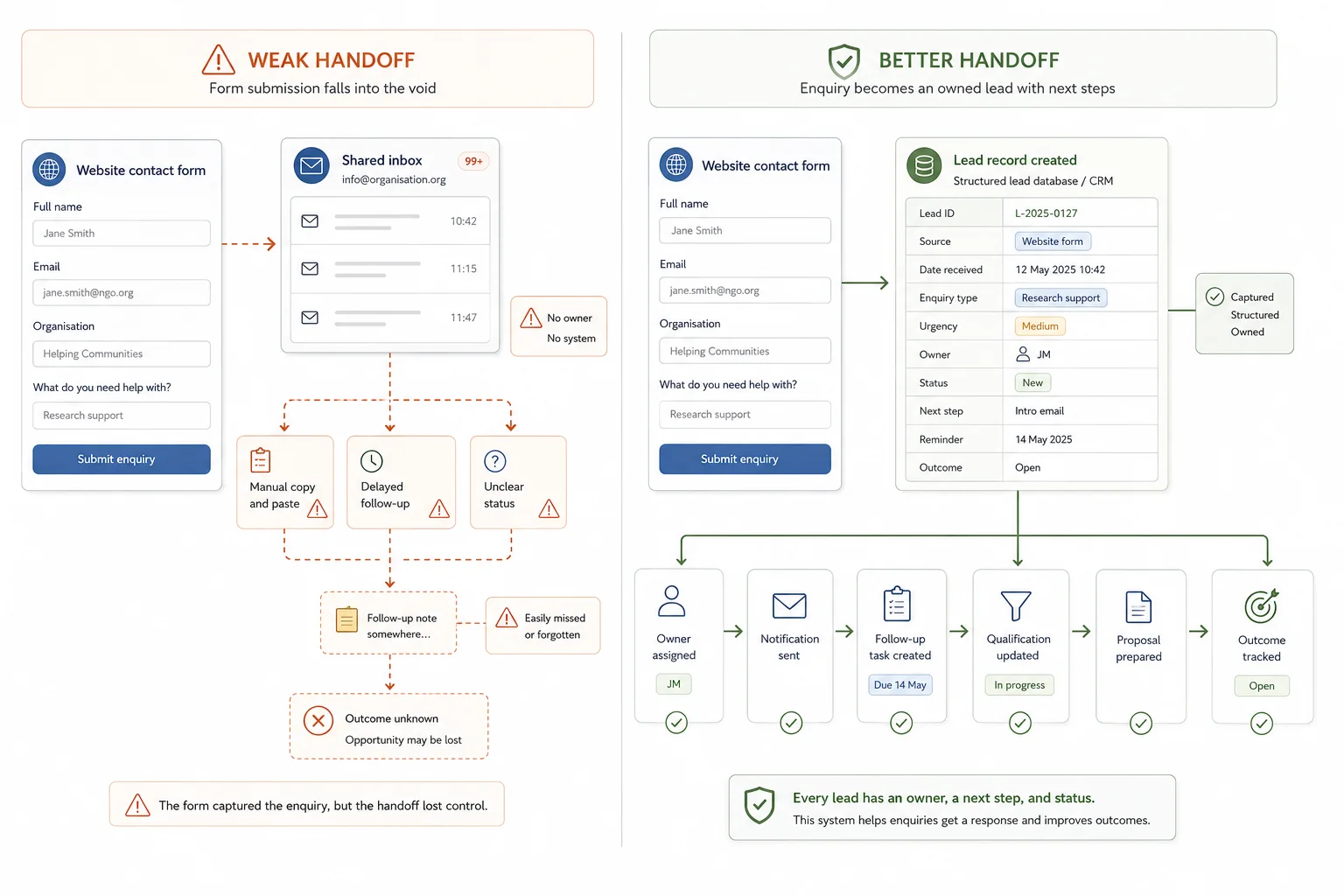
The handoff between the website and the team is where many leads are lost. A better handoff gives the lead a clear path. It also gives the team fewer excuses. There is less "I thought someone else had it", less manual copying, and less guesswork about where the enquiry came from.
Weak handoff vs better handoff
| Weak handoff | Better handoff |
|---|---|
| Form sends an email to a shared inbox | Form creates a structured lead record |
| Nobody clearly owns the enquiry | Lead is assigned using a clear rule |
| Sales asks for missing context | Form captures the fields needed for first response |
| Follow-up depends on memory | Follow-up tasks are created automatically |
| Lead quality is judged by feeling | Fit, source, status, and outcome are tracked |
| Marketing sees form submissions only | Marketing and sales can see the full funnel |
| No clear lost reason | Lost reasons are recorded and reviewed |
Lead records, qualification, and AI support
A good lead process starts by storing each enquiry properly.
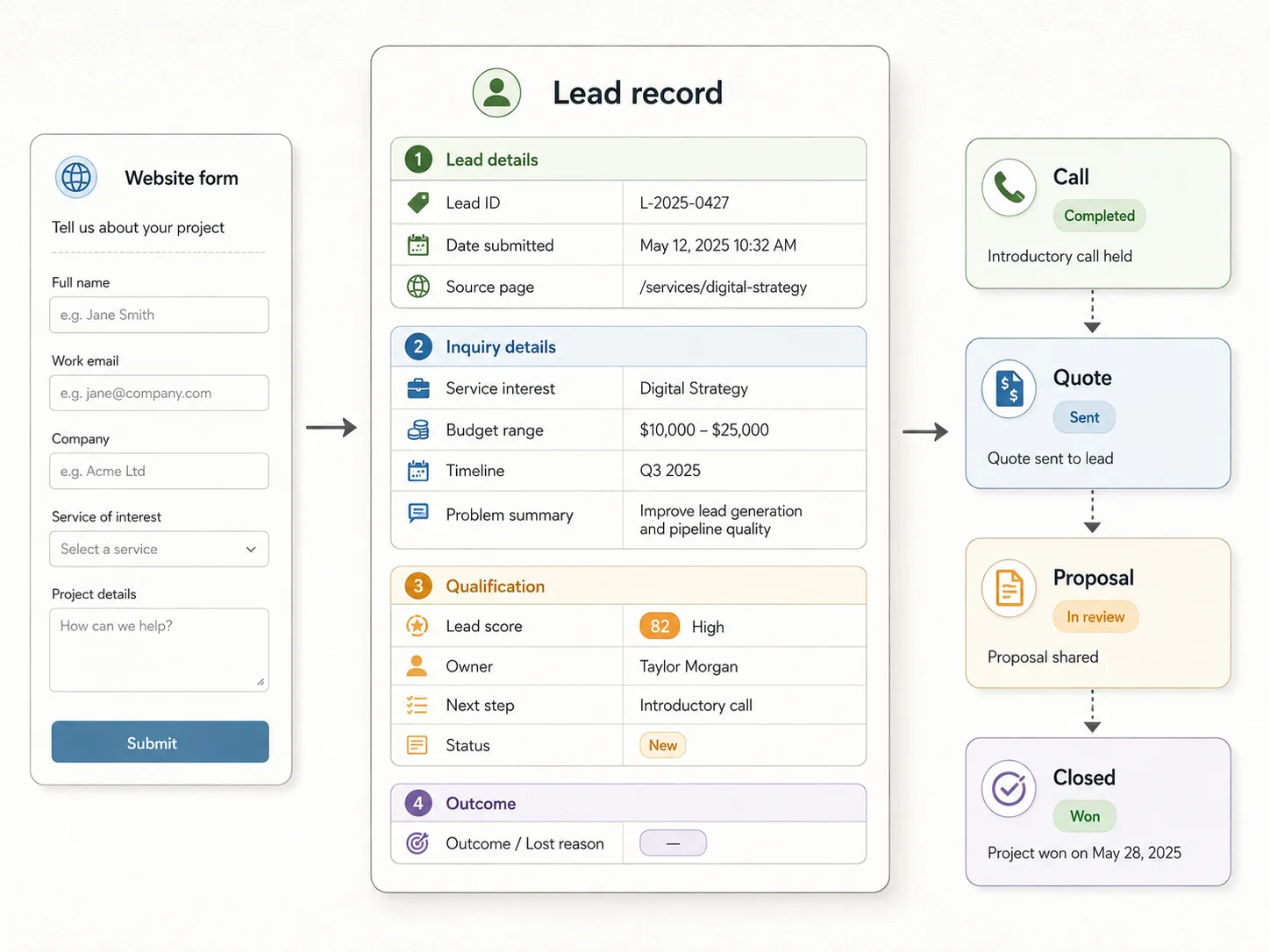
What a useful lead record should include
This is the difference between collecting information and making information usable.
A form submission sitting in an inbox is easy to miss. A structured lead record can be routed, filtered, scored, followed up, reported on, and reviewed later.
Useful lead record fields
| Field | Why it matters |
|---|---|
| Lead ID | Gives every enquiry a clear reference |
| Date submitted | Helps track response time |
| Source page | Shows which page or campaign produced the lead |
| Service interest | Helps route the enquiry |
| Budget range | Helps qualify fit |
| Timeline | Shows urgency |
| Problem summary | Gives sales context |
| Lead score | Helps prioritise |
| Owner | Makes one person responsible |
| Next step | Prevents the lead from sitting idle |
| Status | Tracks progress |
| Lost reason | Helps improve the funnel later |
Lead qualification stops every enquiry being treated the same
Not every website enquiry should receive the same treatment. Some leads are ready to speak now. Some need more information. Some are outside the service area. Some are suppliers, recruiters, students, competitors, or people asking for something the business does not offer.
A broken process treats all enquiries as the same type of task. A better process sorts them.
The score should not replace judgement. It should help the team decide who needs a fast personal response, who should receive more information, and who may need to be filtered out.
Simple lead scoring signals
| Lead signal | Example score |
|---|---|
| Clear project need | +3 |
| Budget range provided | +2 |
| Needs help within 30 days | +3 |
| Fits a core service | +3 |
| Vague enquiry only | +1 |
| Outside service area | -2 |
| No budget or no timeline | -1 |
AI can help, but only if the workflow is structured
AI can be useful after a form is submitted, especially when enquiries include long answers, project notes, or messy information. It can help with summarising the enquiry, identifying the likely service need, flagging urgency, drafting an internal sales note, suggesting follow-up questions, preparing a discovery call brief, grouping leads by problem type, and turning long form responses into cleaner CRM notes.
But AI works best when the process around it is clear. If the form is vague, the database is messy, and the CRM has no status rules, AI will not fix the process. It may only summarise the mess faster.
The better approach is to build the structure first: fields, records, ownership, statuses, routing, and follow-up. Then AI can sit on top of that workflow and help the team process lead information faster.
Improve the process around the form
This is not an argument against improving the form. It is an argument for improving the workflow behind it as well.
Website performance still matters
If the form is confusing, slow, too long, broken on mobile, or hard to submit, fewer people will complete it. So yes, improve the page. Make the form easy to use. Test it on mobile. Remove unnecessary fields. Make the CTA clear.
But do not stop there. A high-converting form can still send leads into a weak sales process. A fast landing page can still create slow follow-up. A well-designed form can still produce poor reporting if the lead data is not stored properly.
Form optimisation improves intake. Process optimisation improves outcomes.
The thank-you page should move the lead forward
Many thank-you pages are dead ends. They say something like: thanks for your enquiry, we will be in touch.
That is better than no confirmation, but it does not make the next step easier.
A stronger thank-you page can explain what happens next, show expected response time, offer a booking link, suggest a relevant resource, ask one useful extra question, direct the lead to a calculator or case study, or confirm the details they submitted.
The goal is not to overload the lead. The goal is to keep momentum while intent is still fresh.
What to measure after fixing the process
Form submissions are not enough. They only tell you how many people filled in the form. They do not show whether the business handled those leads well.
Better metrics include form conversion rate, time to first response, percentage of leads contacted, percentage of leads qualified, booked call rate, quote or proposal rate, close rate by source, follow-up completion rate, lost lead reasons, and revenue by lead source.
These numbers help separate website problems from process problems.
Quick lead process audit
Review your last 20 website enquiries. Ask where each lead came from, how long the first response took, who owned the lead, whether the lead was entered into a CRM or tracker, whether the enquiry was qualified, whether a next step was created, whether follow-up happened, whether the outcome was recorded, whether you know why lost leads were lost, and whether marketing and sales can both see the same status.
If you cannot answer these questions, the problem is not only the website form. The process behind it needs attention.
How to fix the process behind your website form
Start by mapping the current journey from submission to outcome.
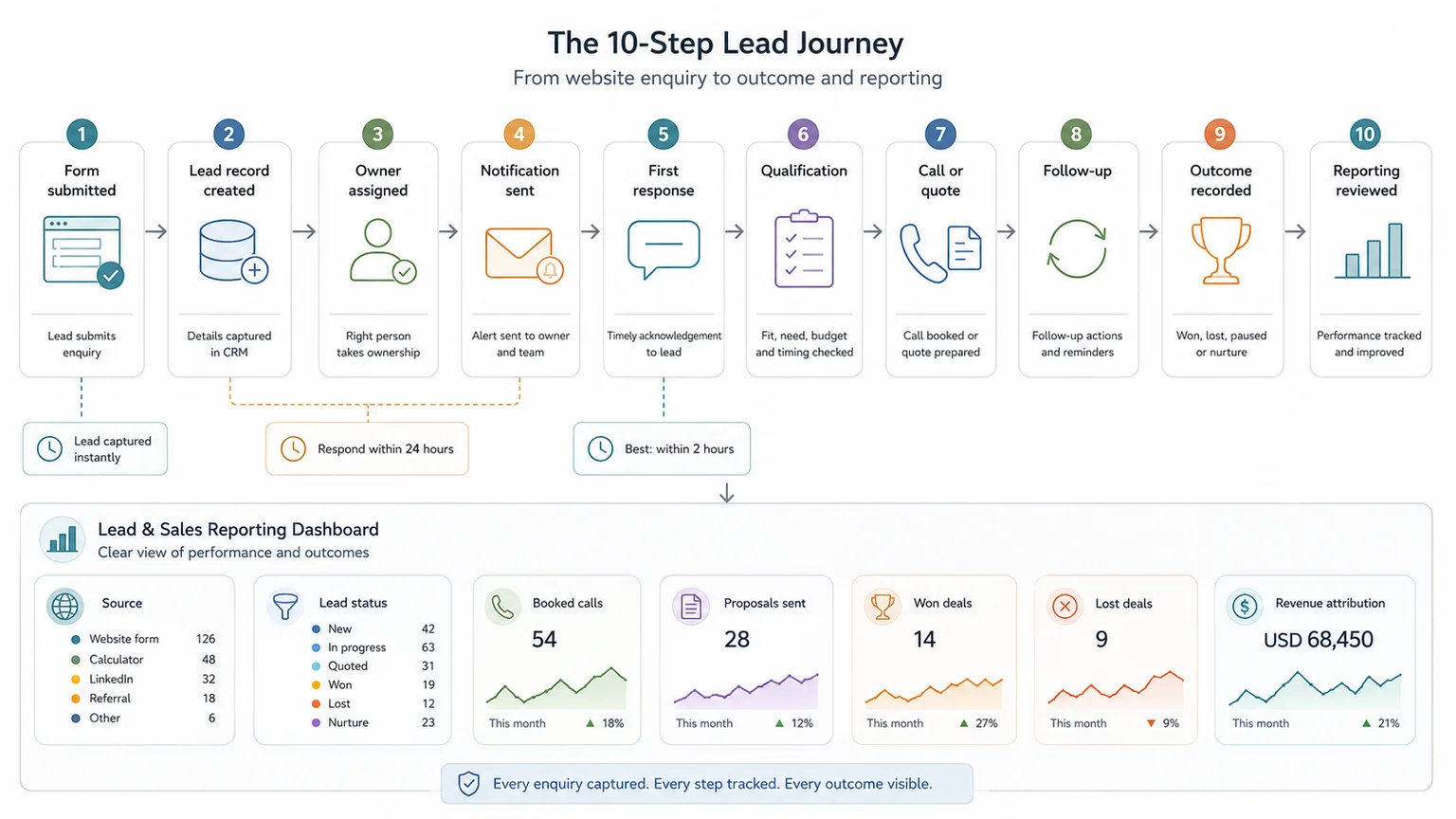
Map the lead journey
A simple journey looks like this:
1. Visitor submits the form. 2. Lead record is created. 3. Lead is assigned. 4. Internal notification is sent. 5. First response happens. 6. Lead is qualified. 7. Call, quote, proposal, or next step is booked. 8. Follow-up happens. 9. Outcome is recorded. 10. Reporting is reviewed.
Then look for the weak points. Where does the lead slow down? Where does ownership become unclear? Where is data missing? Where is follow-up manual? Where does reporting stop?
Improve the system in the right order
Once the gaps are clear, improve the system in this order:
1. Define the lead types. 2. Improve the form fields. 3. Create a structured lead record. 4. Add routing rules. 5. Set response-time expectations. 6. Create follow-up tasks. 7. Track lead status. 8. Review outcomes.
A better form will not fix a broken handoff. If enquiries sit in an inbox, reach the wrong person, get slow replies, miss key context, or receive no follow-up, the business will still lose opportunities.
The form is only the start. The real value comes from the workflow behind it.
When a simple setup is enough
- The business receives only a few enquiries a month
- One person owns every lead from first reply to outcome
- A simple spreadsheet still gives a clear view of source, status, and next step
When you need a more structured system
- Several people respond to leads
- The business loses track of quotes, proposals, or follow-ups
- You need reporting across source, service interest, response time, and outcome
Common mistakes to avoid
Fixing the form before fixing the follow-up
A cleaner form can improve capture, but it will not solve slow response, unclear ownership, or lost follow-up. Start with the process behind the form.
Collecting fields nobody uses
Every form field should support routing, qualification, response, or reporting. Extra fields add friction without improving the lead process.
Adding AI to vague lead records
AI can help classify and draft responses, but only if the lead data is structured enough to tell the system what matters.
Copyable lead process audit
Use this to check whether the process behind the form is working
| Check | Done |
|---|---|
| Every form submission creates a structured lead record | |
| Each lead has an owner | |
| The team can see lead source, service interest, urgency, and next step | |
| Follow-up reminders are automatic or clearly assigned | |
| Lead status is updated consistently | |
| Outcomes are tracked after the first response |
Related resources
Use these next if the form problem connects to database structure, AI-supported follow-up, internal process cost, or a stronger intake workflow.
- Traceable Evidence Workflow Support - use this if lead data needs a better structure
- Traceable Evidence Workflow Support - use this if you want AI support on top of a clear lead process
- Reporting Bottleneck Cost Calculator - use this to estimate the cost of slow internal processes
- Search and Review Time Savings Calculator - use this if people spend time looking for lead context
- Data Collection & Intake Systems - use this if form inputs need a clearer route into structured records
- Why AI gives weak answers when source material is messy - use this if the same data problem appears in AI workflows
FAQ
What is the difference between a website form and a lead capture system?
A website form collects the enquiry. A lead capture system manages what happens after the enquiry is submitted. That can include creating a lead record, assigning an owner, sending a confirmation email, notifying the team, scoring the lead, creating a follow-up task, and tracking whether the lead becomes a call, quote, proposal, or sale.
Why are people filling in our website form but not becoming customers?
The issue may be after the form. Slow response times, weak routing, unclear ownership, poor qualification, missing follow-up, or poor tracking can all stop website enquiries from becoming customers.
Should website form submissions go straight into a CRM?
For most sales-led businesses, yes. A CRM or structured lead database helps track ownership, source, status, follow-up, and outcomes. Without that, leads often sit in inboxes or spreadsheets with limited visibility.
How fast should we respond to website leads?
For high-intent enquiries, the first response should usually happen as quickly as possible. Lead response research shows that contact and qualification odds can drop sharply when teams wait too long, especially during the first hour.
Can automation improve website lead follow-up?
Yes. Automation can create records, send confirmations, notify the right person, assign tasks, update statuses, and trigger follow-up workflows. It should support the sales process rather than replace the human judgement needed for higher-value enquiries.
Can AI help with website leads?
Yes, if the lead process is already structured. AI can summarise enquiries, flag urgency, suggest follow-up questions, and prepare sales notes. It is much less useful when the form, database, routing, and CRM process are unclear.
A better form will not fix a broken lead process
Your website form is not the finish line. It is the handoff point between buyer intent and your internal sales process.
If that handoff is slow, unclear, or manual, better form design will only send more enquiries into the same broken system.
I help service businesses and sales-led teams connect website forms, calculators, bookings, and project briefs to structured databases, workflow automation, internal summaries, CRM-ready records, and simple follow-up systems. The goal is not just more form submissions. It is a cleaner route from enquiry to response, qualification, proposal, and close.
Sources used in this guide
Data Collection & Intake Systems
Collect useful, traceable data from the start through forms, fieldwork tools, public submission portals, partner reporting systems, calculators, and intake workflows.